> For the complete documentation index, see [llms.txt](https://docs.algomojo.com/algomojo/llms.txt). Markdown versions of documentation pages are available by appending `.md` to page URLs; this page is available as [Markdown](https://docs.algomojo.com/algomojo/my-group-signals/orders.md).
# Orders
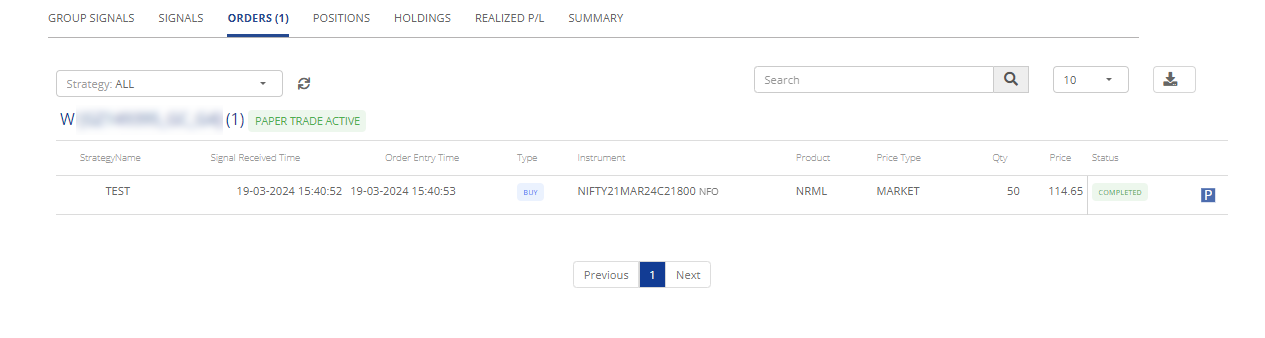
The "Group Orders" tab serves as a centralized hub within "My Orders," offering a comprehensive overview of trading orders associated with a specific group of strategies. This feature streamlines the management of your trading activities by consolidating essential details related to group orders.
**Group Orders:**
* **Order ID:** A unique identifier assigned to each trading order within the group, facilitating easy tracking and referencing.
* **Strategy Name:** The name of the strategy to which the orders belong, providing clarity and organization.
* **Date:** The date and time when the trading order was placed within the group.
* **Type:** Specifies the type of order, whether it is a market order, limit order, stop order, or other order types available in the trading system.
* **Symbol:** Indicates the trading symbol or asset associated with the order within the group.
* **Quantity:** The quantity or volume of the asset specified in the order.
* **Price:** The price level or range at which the order is placed within the group.
* **Status:** Indicates the current status of the order, whether it's pending, executed, canceled, or has a different status.
* **Remarks:** Additional notes or comments related to the order, providing context or explanations regarding specific conditions or instructions associated with the order within the group.