> For the complete documentation index, see [llms.txt](https://docs.algomojo.com/algomojo/llms.txt). Markdown versions of documentation pages are available by appending `.md` to page URLs; this page is available as [Markdown](https://docs.algomojo.com/algomojo/my-signals/orders.md).
# Orders
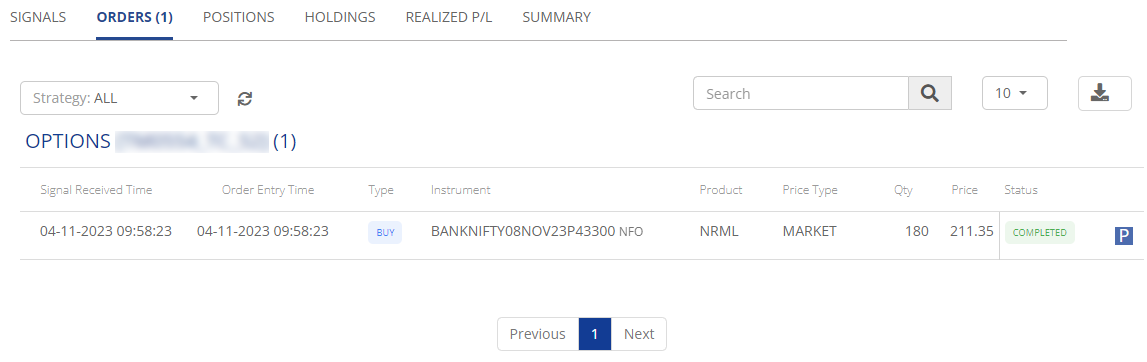
The "Orders" tab provides an overview of your trading orders, including essential details to help you manage your trading activities effectively.
* **Signal Received Time:** This column displays the timestamp when the trading signal was received, providing insight into the timing of the order.
* **Order Entry Time:** Order Entry Time represents the timestamp when the order was entered into the system, enabling you to track the order placement time.
* **Type:** The Type column specifies the order type, whether it's a Buy or Sell, defining how the order will be executed.
* **Instrument:** Instrument indicates the trading instrument or asset for which the order is placed, helping you identify the specific asset involved.
* **Product:** The Product column provides information about the financial product associated with the order, such as stocks, futures, or options.
* **Price Type:** Price Type details the pricing method used for the order, whether it's based on the current market price, a specific limit price, or another pricing strategy.
* **Quantity:** Quantity specifies the size or quantity of the order, indicating the number of units or contracts being bought or sold.
* **Price:** Price represents the specific price level at which the order is placed, serving as the execution price for the trade.
* **Status:** The Status column indicates the current state of the order, whether it's pending, executed, or has a different status, providing an overview of the order's progress.
The "Orders" tab is an essential tool for tracking and managing your trading orders, ensuring you have all the necessary information to make informed trading decisions.