> For the complete documentation index, see [llms.txt](https://docs.algomojo.com/algomojo/llms.txt). Markdown versions of documentation pages are available by appending `.md` to page URLs; this page is available as [Markdown](https://docs.algomojo.com/algomojo/my-signals/signals.md).
# Signals
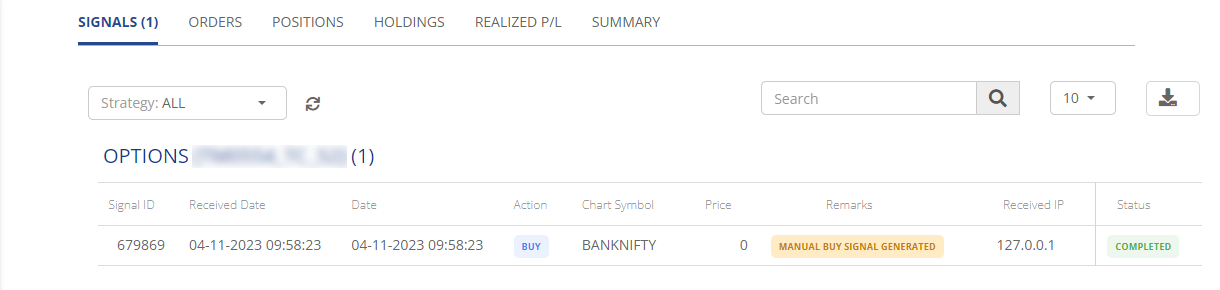
The "Signals" tab is a crucial component of "My Signals." It serves as an informative dashboard where you can access trading signals generated by your trading strategy. These signals provide valuable insights into market conditions, offering recommendations on when to buy or sell specific assets. By monitoring the "Signals" tab, you can make well-informed trading decisions and capitalize on potential market opportunities.
* **Signal ID:** Signal ID is a unique identifier assigned to each trading signal. It helps in tracking and referencing specific signals within the system.
* **Received Date:** The Received Date represents the date and time when the trading signal was received. It provides information about the timing of the signal.
* **Date:** Date refers to the date on which the trading action is recommended. It's the date when the signal suggests making a move in the market.
* **Action:** The Action column specifies the recommended action to be taken based on the signal. It typically includes actions like "Buy," "Sell," or "Hold.
* **Chart Symbol:** Chart Symbol indicates the trading symbol or asset to which the signal is related. It helps traders identify the specific asset for which the signal is applicable.
* **Price:** The Price column displays the price level or range at which the recommended action should be executed. It provides the pricing information needed to act on the signal.
* **Remarks:** Remarks may include additional notes or comments related to the signal. It can provide context or explanations regarding the signal's significance or conditions.
* **Received IP:** Received IP represents the IP address from which the signal was received. It can help in tracking the source of the signal.
* **Status:** The Status column indicates the current state of the signal, whether it's pending, executed, or has a different status. It provides an overview of the signal's progress.