> For the complete documentation index, see [llms.txt](https://docs.algomojo.com/algomojo/llms.txt). Markdown versions of documentation pages are available by appending `.md` to page URLs; this page is available as [Markdown](https://docs.algomojo.com/algomojo/my-signals/summary.md).
# Summary
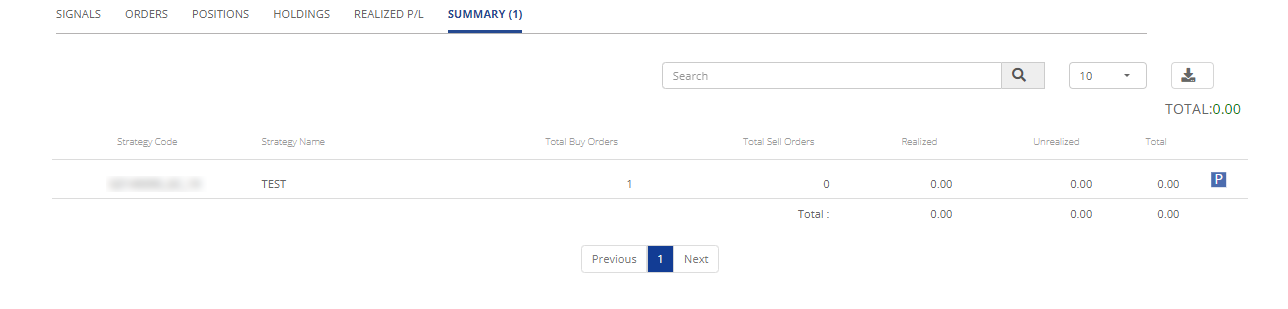
The "Summary" tab provides a consolidated view of your trading activities, including key metrics and information to evaluate your trading strategy's performance.
* **Strategy Code:** Strategy Code is a unique identifier assigned to your trading strategy, helping you distinguish and reference your strategies within the system.
* **Strategy Name:** Strategy Name represents the name or label associated with your trading strategy, providing context about its purpose and focus.
* **Total Buy Orders:** Total Buy Orders indicates the cumulative number of buy orders placed as part of your strategy's execution.
* **Total Sell Orders:** Total Sell Orders represents the total count of sell orders initiated as part of your trading strategy.
* **Realized :** The Realized column displays the profit or loss realized from completed trades within your strategy, showing the financial outcome of your trading activities.
* **Unrealized:** In the context of trading, "unrealized" refers to gains or losses on investments that have not yet been realized through the sale of the investment.
* **Total:** you will see the total summary of the values.
* **Papertrade Flag (Blue Colour flag P) Summary:** This flag indicates that the trading activity associated with this summary is based on paper trading.
* **Livetradeflag Summary:** This summary is associated with live trading activity summary.
The "Summary" tab offers a comprehensive overview of your trading strategy's performance, enabling you to assess its effectiveness and results in a clear and organized manner.