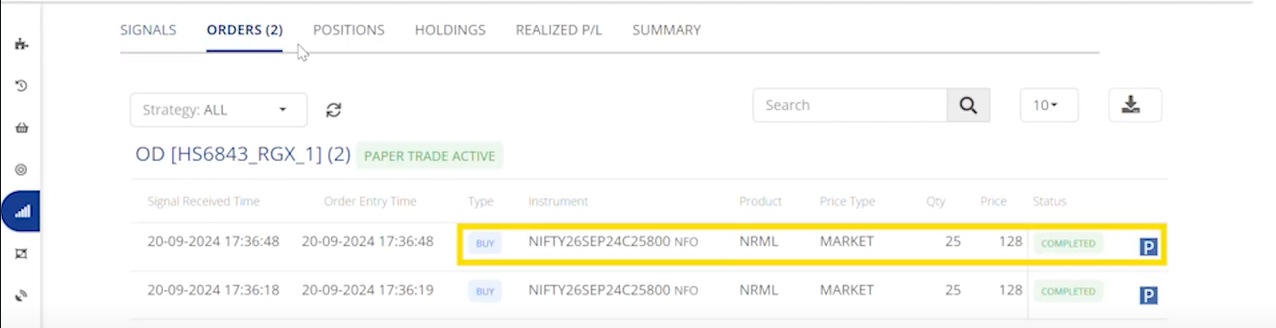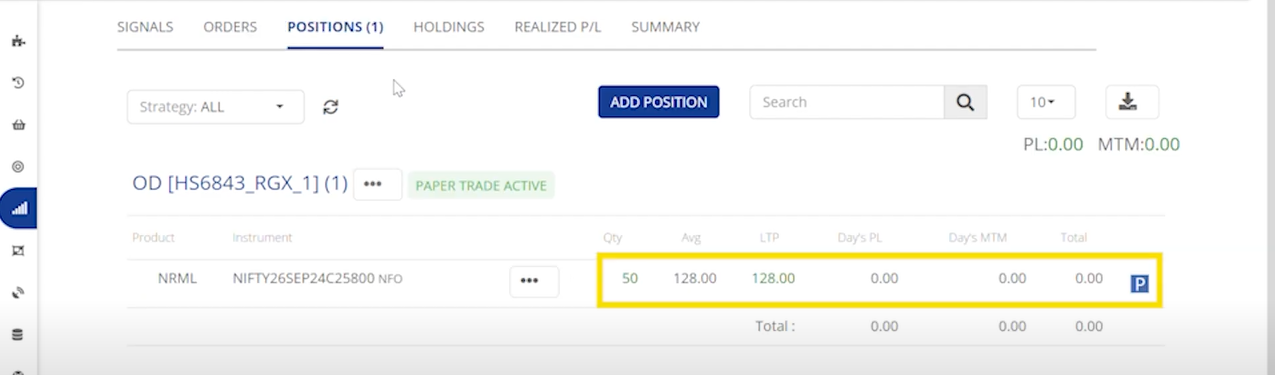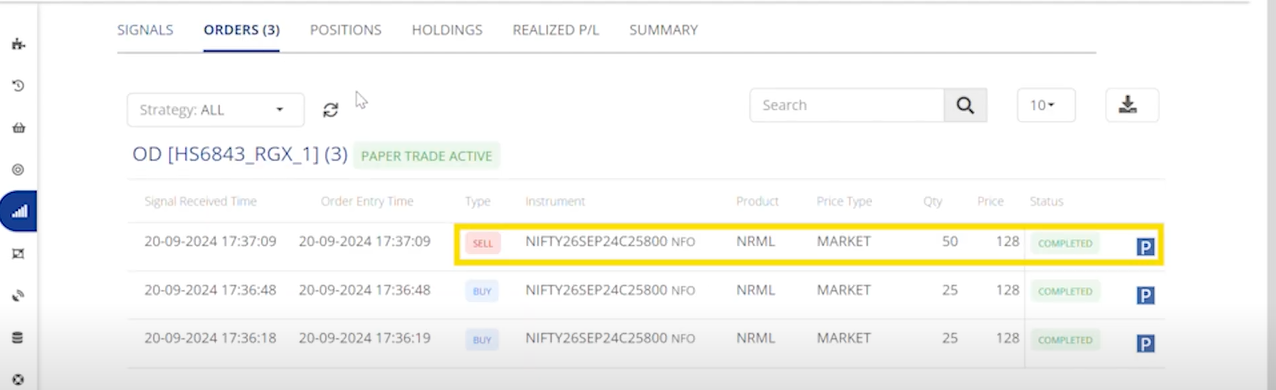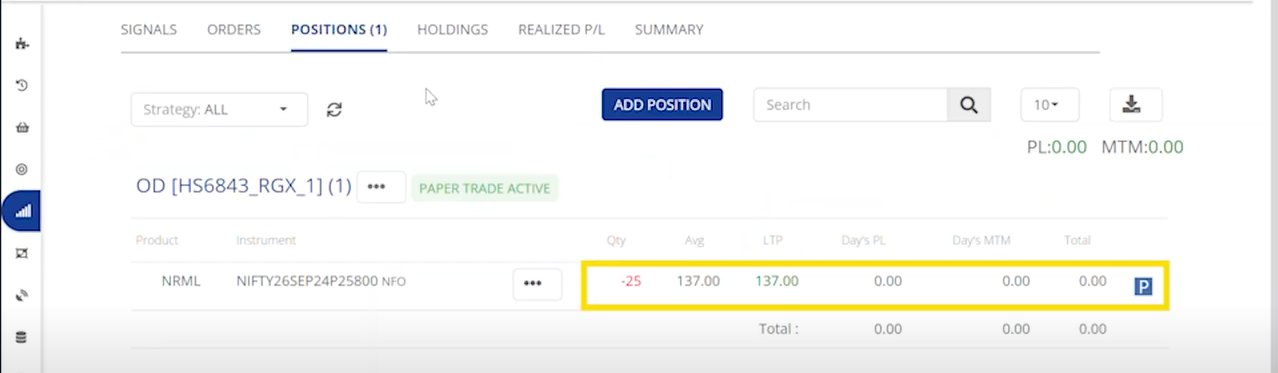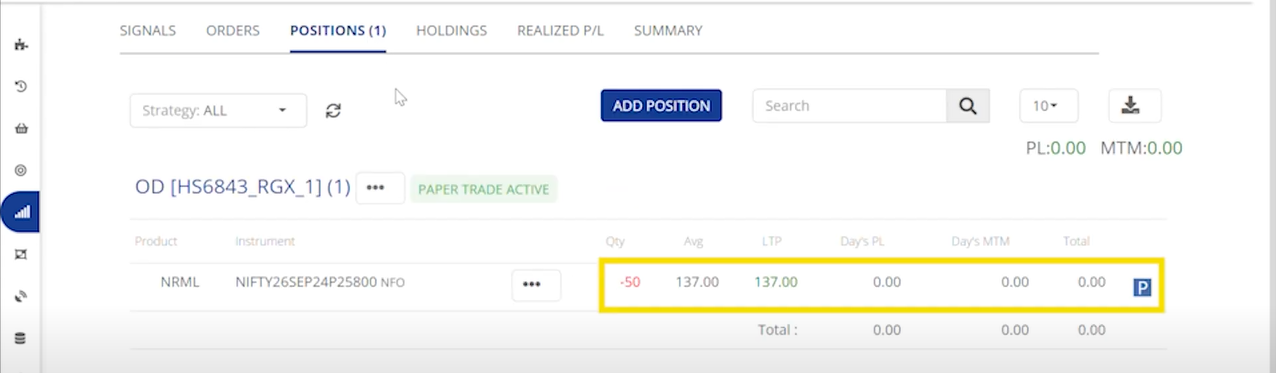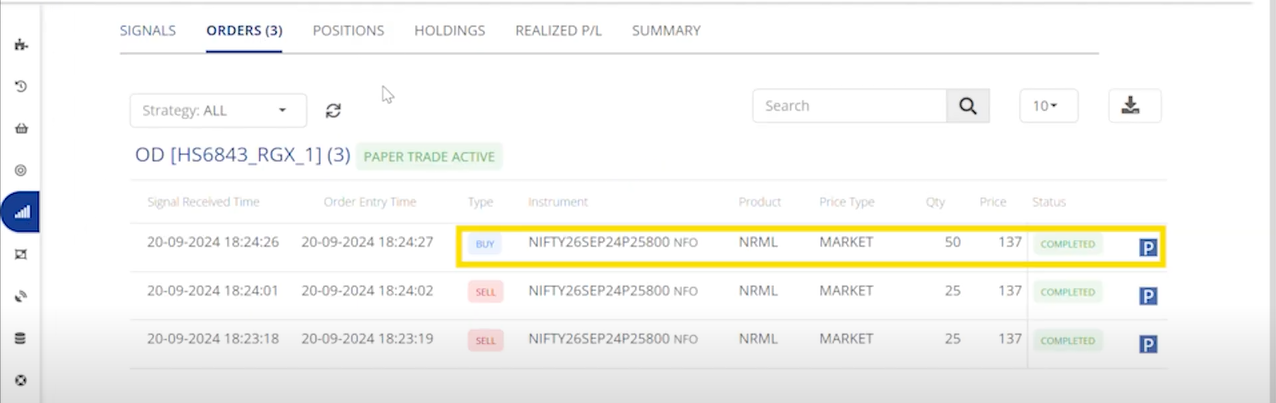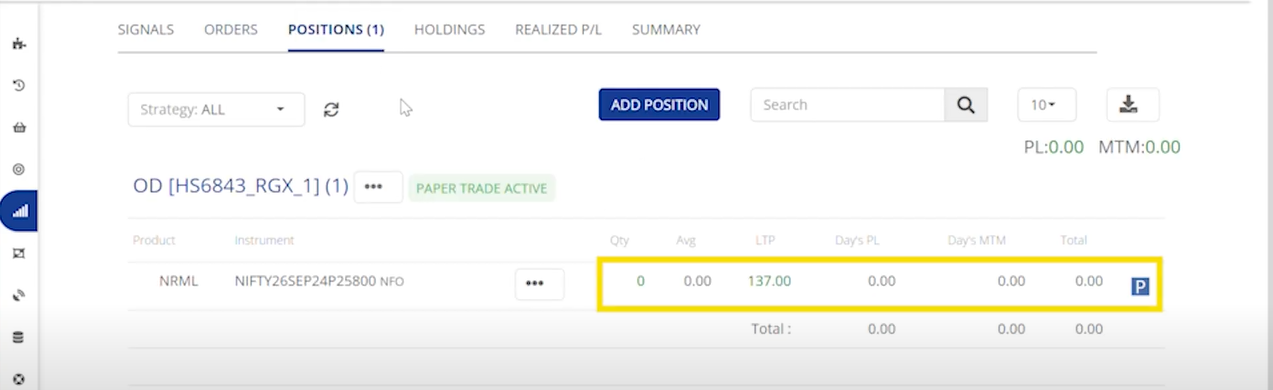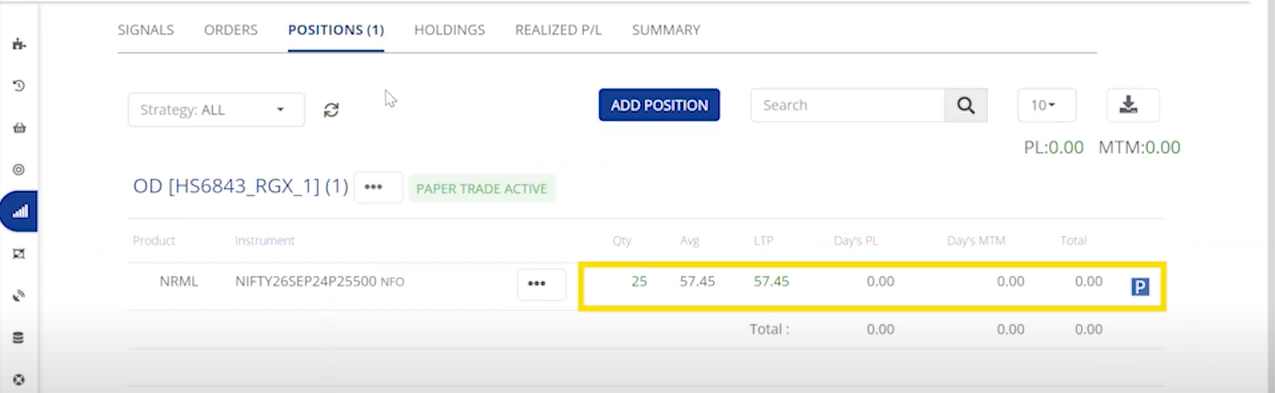
# LONG ONLY

## ***Equity***

<table data-header-hidden data-full-width="false"><thead><tr><th></th><th></th><th></th></tr></thead><tbody><tr><td><strong>Signal Action</strong></td><td>BUY</td><td>SELL</td></tr><tr><td><strong>Signal Type</strong></td><td>Entry</td><td>Exit</td></tr><tr><td><strong>Order action</strong></td><td>Entry Order</td><td>Exit Order</td></tr><tr><td><strong>Position check</strong></td><td>Not Available</td><td>Yes(Open)</td></tr><tr><td><strong>Square-off Qty</strong></td><td>Not Available</td><td>If No Open Positions, No Order will be Placed</td></tr></tbody></table>

Example :&#x20;

{% embed url="<https://www.youtube.com/watch?v=ms88CkqdzWk>" %}

**Buy :**&#x20;

<figure><img src="https://3325206621-files.gitbook.io/~/files/v0/b/gitbook-x-prod.appspot.com/o/spaces%2FVBwGEcLA1yP8wEVFrXXf%2Fuploads%2F6g429snBMEvtTpVdzDEK%2Fimage.png?alt=media&#x26;token=1c2f9d59-f296-4e76-b74e-5f72321bde5a" alt=""><figcaption><p>Orders</p></figcaption></figure>

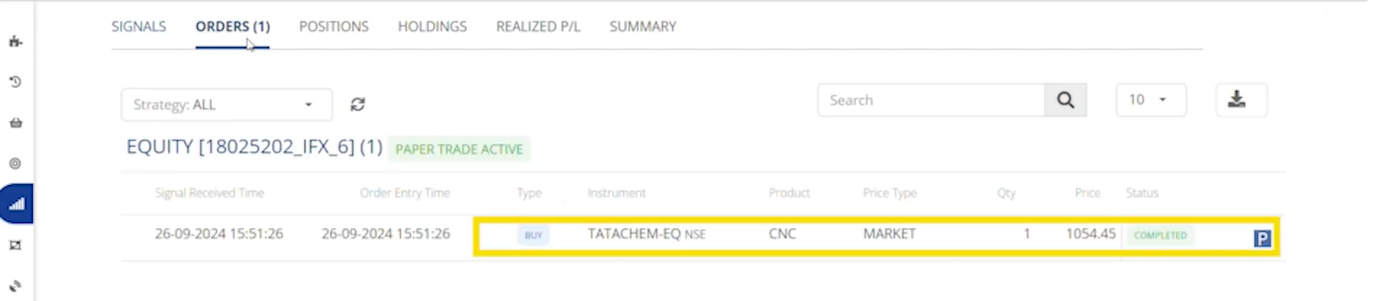
The Orders tab displays the instrument symbol and indicates that one share of long Tata chemical Equity has been bought.

<figure><img src="https://3325206621-files.gitbook.io/~/files/v0/b/gitbook-x-prod.appspot.com/o/spaces%2FVBwGEcLA1yP8wEVFrXXf%2Fuploads%2FgBFU8DVpbwkQcPqUr0Dz%2Fimage.png?alt=media&#x26;token=0f6bde44-2553-4270-8009-a7d6ed6ce4e7" alt=""><figcaption><p>Positions</p></figcaption></figure>

&#x20;The Positions tab indicates that we hold a long Equity position of one share in Tata chemical.

**Sell :**&#x20;

<figure><img src="https://3325206621-files.gitbook.io/~/files/v0/b/gitbook-x-prod.appspot.com/o/spaces%2FVBwGEcLA1yP8wEVFrXXf%2Fuploads%2FrdLjFsRw8M3ogVonQjiG%2Fimage.png?alt=media&#x26;token=159558a4-8400-47d1-922f-6066396bba77" alt=""><figcaption><p>Orders</p></figcaption></figure>

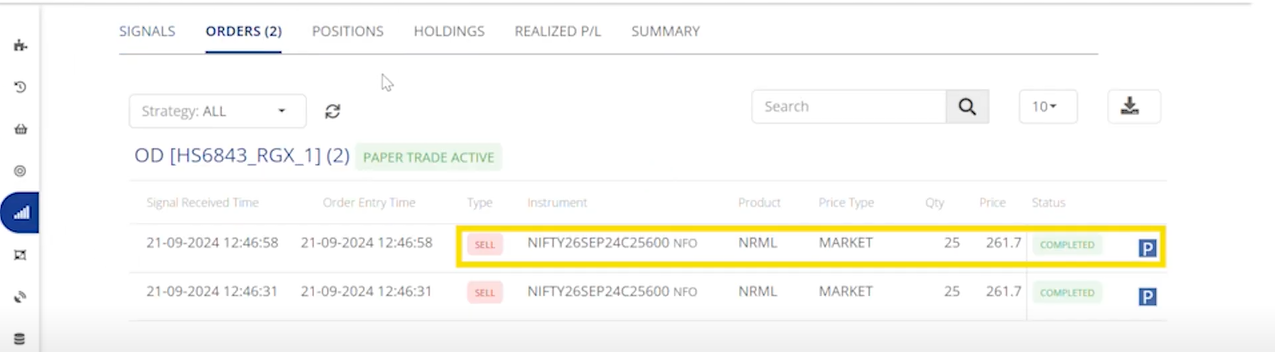
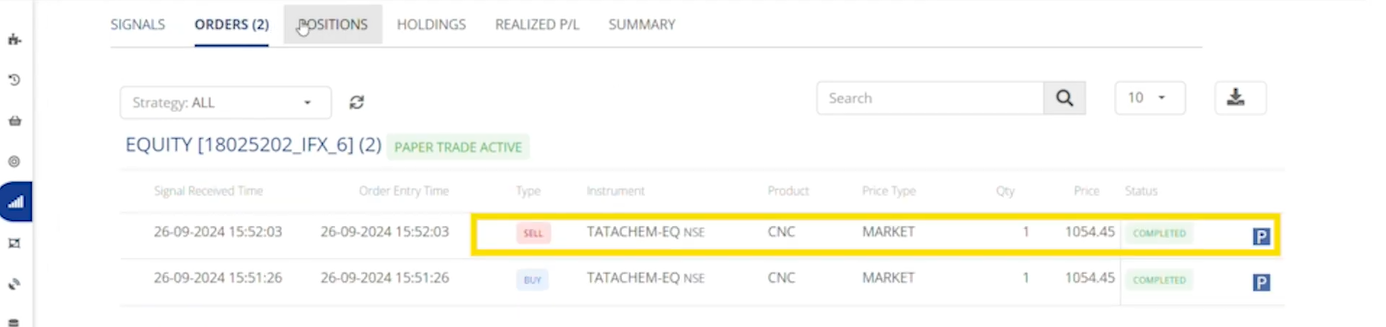
The Orders tab shows a sell order, and this sell order will exit the existing long equity position.

<figure><img src="https://3325206621-files.gitbook.io/~/files/v0/b/gitbook-x-prod.appspot.com/o/spaces%2FVBwGEcLA1yP8wEVFrXXf%2Fuploads%2FbaQUmt7l4klC8H7gWsk7%2Fimage.png?alt=media&#x26;token=5b6ea4ba-7d47-4d1b-a40b-d9ec9ebcc5d5" alt=""><figcaption><p>Positions</p></figcaption></figure>

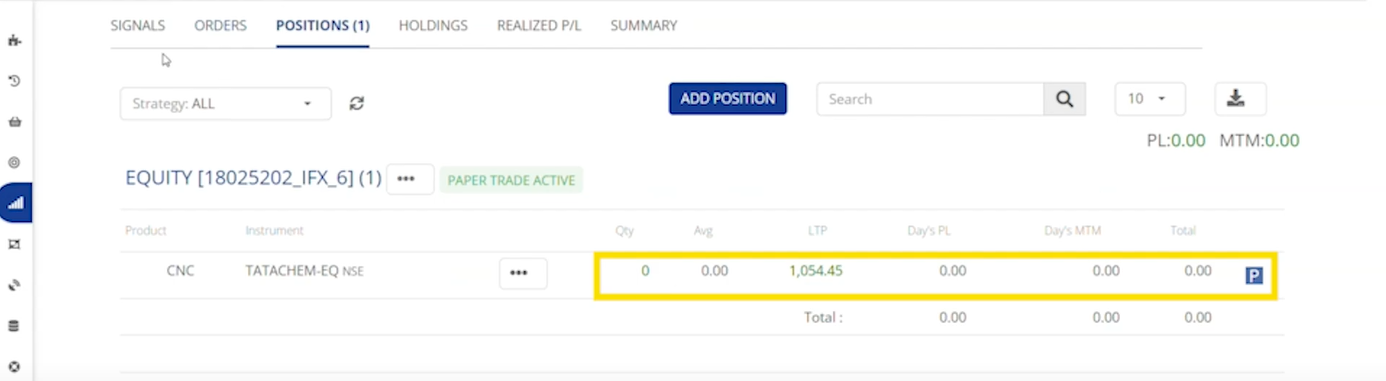
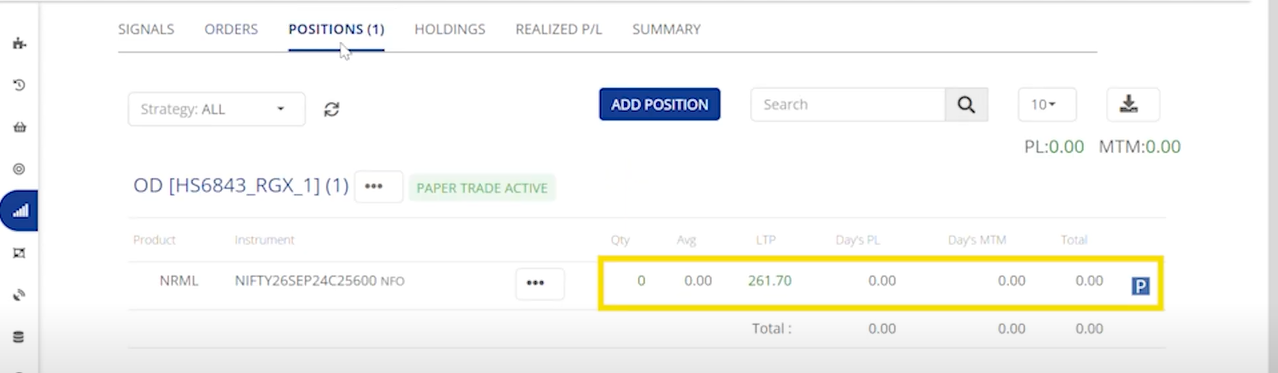
Under the Positions tab, you will see that the long Tata chemical Equity position has been squared off.

## ***Futures***

<table data-header-hidden><thead><tr><th width="172"></th><th width="202"></th><th width="334"></th><th data-hidden></th></tr></thead><tbody><tr><td><strong>Order Action</strong> </td><td>BUY </td><td>SELL</td><td></td></tr><tr><td><strong>Signal Type</strong> </td><td>Long Position Entry</td><td>Long Position Exit</td><td></td></tr><tr><td><strong>Order type</strong></td><td>Entry Order</td><td>Exit Order</td><td></td></tr><tr><td><strong>Position check</strong></td><td>No</td><td>Yes(Long)</td><td></td></tr><tr><td><strong>Square-off Qty</strong></td><td>Not Available</td><td>If No Long Open Positions, No Order will be Placed</td><td></td></tr></tbody></table>

Example :&#x20;

{% embed url="<https://www.youtube.com/watch?v=TFrhhSZJq5E>" %}

**Buy :**&#x20;

<figure><img src="https://3325206621-files.gitbook.io/~/files/v0/b/gitbook-x-prod.appspot.com/o/spaces%2FVBwGEcLA1yP8wEVFrXXf%2Fuploads%2FG7OfZ4eqFtv7oMN9Do7F%2Fimage.png?alt=media&#x26;token=8b5280b5-0a7b-4704-ad7b-3771ed72ab22" alt=""><figcaption><p>Orders</p></figcaption></figure>

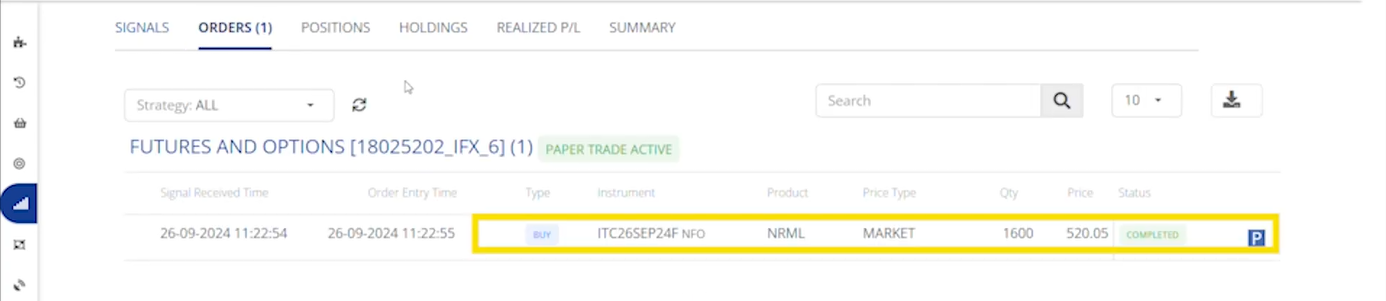
The Orders tab displays the instrument symbol and indicates that one lot of long future position has been bought.

<figure><img src="https://3325206621-files.gitbook.io/~/files/v0/b/gitbook-x-prod.appspot.com/o/spaces%2FVBwGEcLA1yP8wEVFrXXf%2Fuploads%2FH81SWfwgAvGvGjOB8OjD%2Fimage.png?alt=media&#x26;token=80852e3f-1fa7-406a-aceb-eb87a03d5c1a" alt=""><figcaption><p>Positions</p></figcaption></figure>

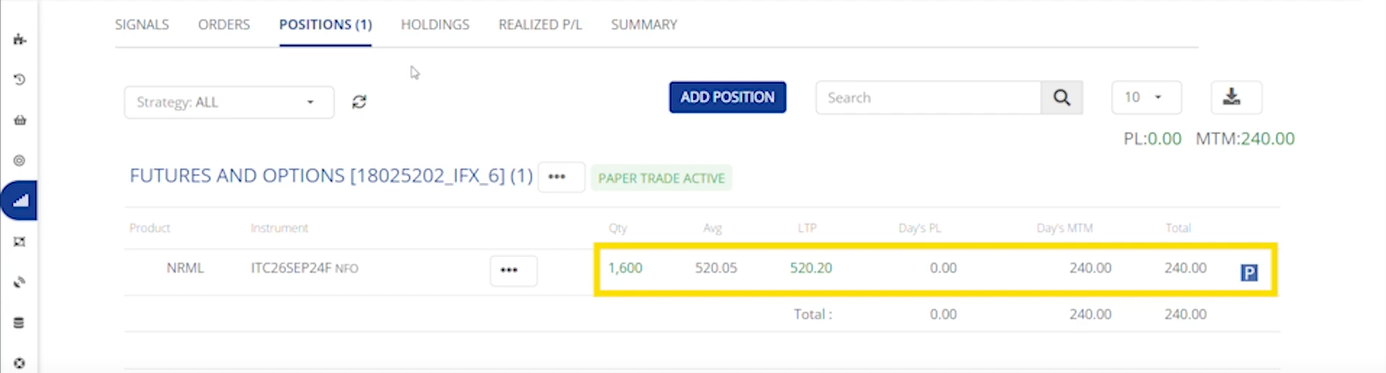
The Positions tab indicates that we hold a long Futures position of one lot in ITC.

**Second Buy :**&#x20;

<figure><img src="https://3325206621-files.gitbook.io/~/files/v0/b/gitbook-x-prod.appspot.com/o/spaces%2FVBwGEcLA1yP8wEVFrXXf%2Fuploads%2FrpyvdyN8eKm0Ue2XZDeP%2Fimage.png?alt=media&#x26;token=72d3d990-ddf7-4dad-b571-2735c0bebfef" alt=""><figcaption><p>Orders</p></figcaption></figure>

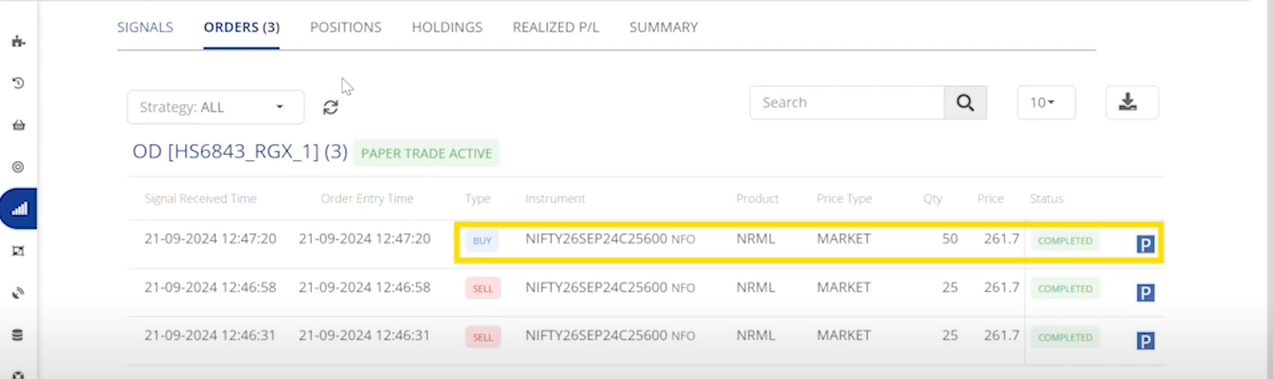
The Order tab Updates with a second buy order.

<figure><img src="https://3325206621-files.gitbook.io/~/files/v0/b/gitbook-x-prod.appspot.com/o/spaces%2FVBwGEcLA1yP8wEVFrXXf%2Fuploads%2FWItvfGkYv62uFfr91Wrz%2Fimage.png?alt=media&#x26;token=b3bcf0af-6ec8-42fd-ad55-39f5a0f32024" alt=""><figcaption><p>Positions</p></figcaption></figure>

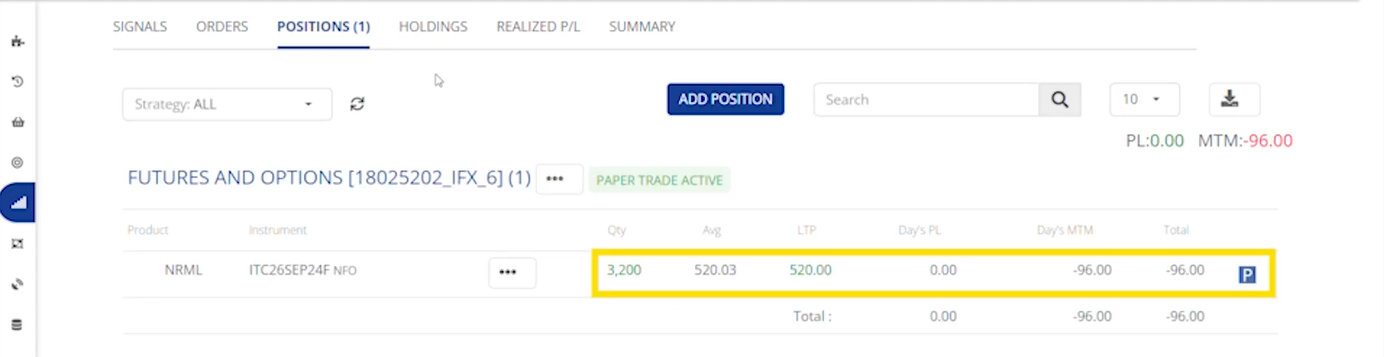
The Positions tab shows a total of two long lots of ITC Futures.

**Sell :**&#x20;

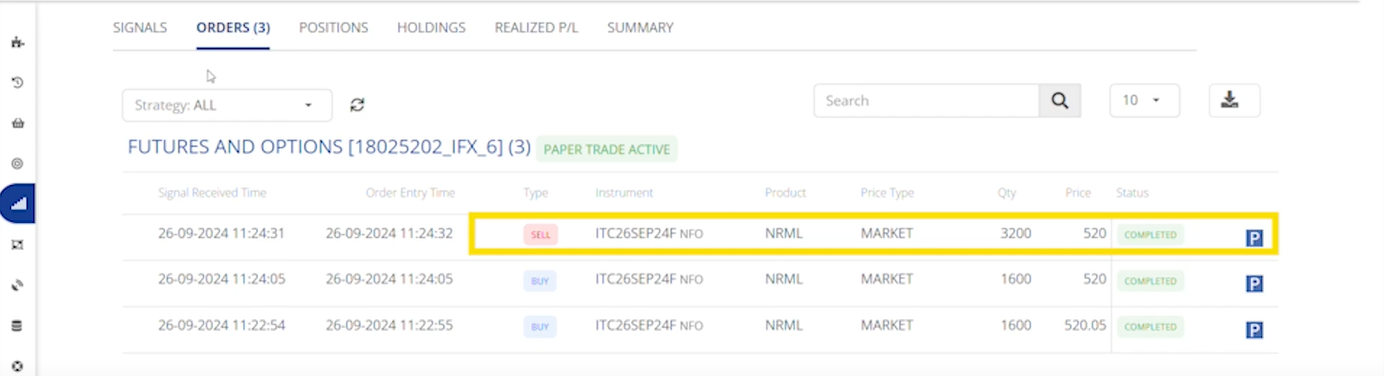
<figure><img src="https://3325206621-files.gitbook.io/~/files/v0/b/gitbook-x-prod.appspot.com/o/spaces%2FVBwGEcLA1yP8wEVFrXXf%2Fuploads%2FYekZ2niRoie7xm43TBv3%2Fimage.png?alt=media&#x26;token=e235f77f-74f4-4811-baf6-093a3fe2f194" alt=""><figcaption><p>Orders</p></figcaption></figure>

The Orders tab shows a sell order, and this sell order will exit the existing long futures position.

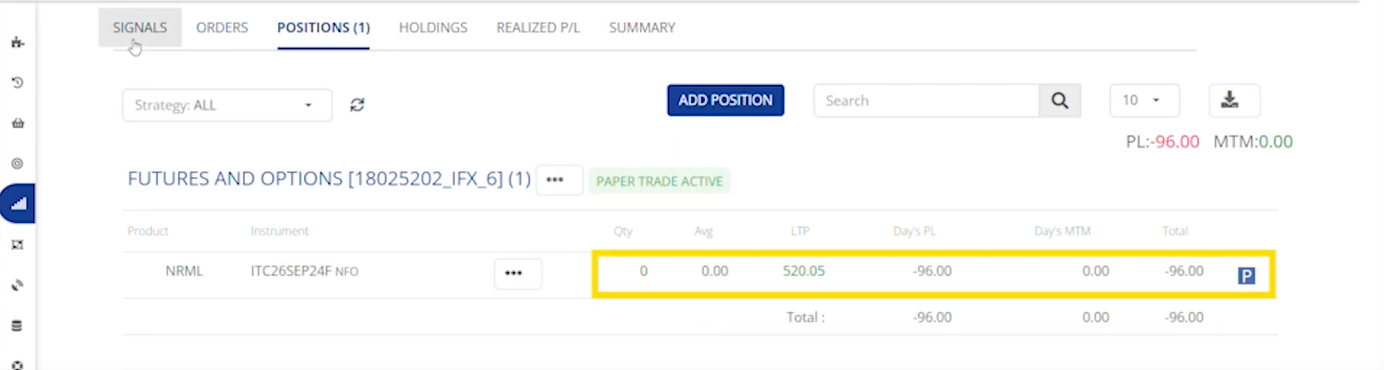
<figure><img src="https://3325206621-files.gitbook.io/~/files/v0/b/gitbook-x-prod.appspot.com/o/spaces%2FVBwGEcLA1yP8wEVFrXXf%2Fuploads%2FZvr8RbIosBxY5U1nIlKH%2Fimage.png?alt=media&#x26;token=9f5fe272-783e-4b47-afde-f7321f16ba42" alt=""><figcaption><p>Positions</p></figcaption></figure>

Under the Positions tab, you will see that the long ITC Futures position has been squared off.

## ***Options***

<table data-header-hidden><thead><tr><th width="172"></th><th width="202"></th><th width="334"></th><th data-hidden></th></tr></thead><tbody><tr><td><strong>Order Action</strong> </td><td>BUY </td><td>SELL</td><td></td></tr><tr><td><strong>Signal Type</strong> </td><td>Long Position  Entry</td><td>Long Position Exit</td><td></td></tr><tr><td><strong>Order type</strong></td><td>Entry Order</td><td>Exit Order</td><td></td></tr><tr><td><strong>Position check</strong></td><td>No</td><td>Yes(Long)</td><td></td></tr><tr><td><strong>Square-off Qty</strong></td><td>Not Available</td><td>If No Long Open Positions, No Order will be Placed</td><td></td></tr></tbody></table>

Example :&#x20;

{% embed url="<https://www.youtube.com/watch?v=SmtIKUiheHw>" %}

**Buy :**&#x20;

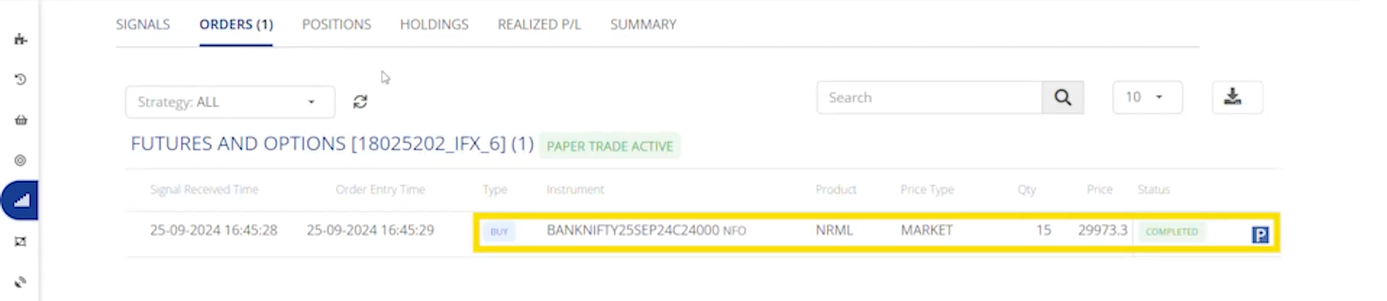
<figure><img src="https://3325206621-files.gitbook.io/~/files/v0/b/gitbook-x-prod.appspot.com/o/spaces%2FVBwGEcLA1yP8wEVFrXXf%2Fuploads%2FY8S8cbx5a6Hqm0i3BGFw%2Fimage.png?alt=media&#x26;token=18666a07-b482-4bb4-ab66-96988bbe5776" alt=""><figcaption><p>Orders</p></figcaption></figure>

The Orders tab displays the instrument symbol and indicates that a call option has been bought.

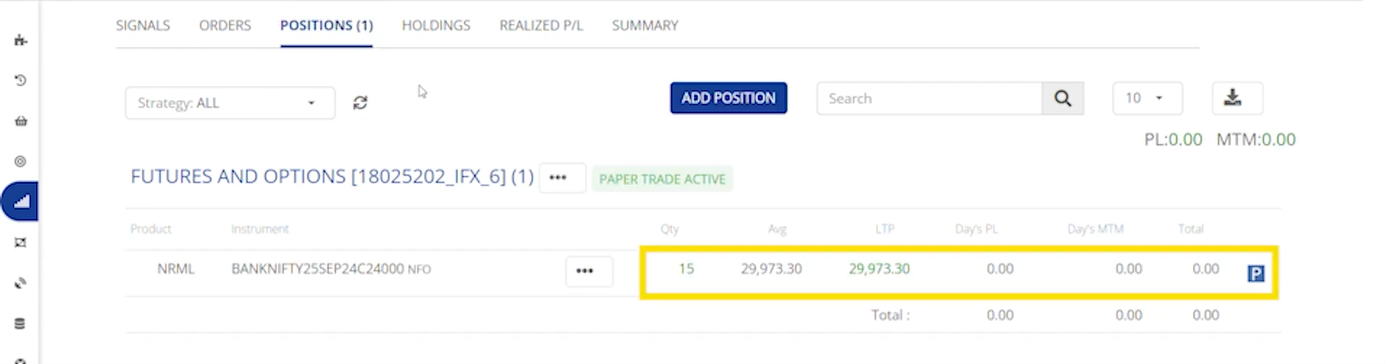
<figure><img src="https://3325206621-files.gitbook.io/~/files/v0/b/gitbook-x-prod.appspot.com/o/spaces%2FVBwGEcLA1yP8wEVFrXXf%2Fuploads%2F6IzTMQ0OYu6ii3IYgc0m%2Fimage.png?alt=media&#x26;token=267d1d57-6d6f-4723-9d6b-436f2a28ea56" alt=""><figcaption><p>Positions</p></figcaption></figure>

The Positions tab indicates that we hold a long position of 1 lot in BankNifty call options.

**Second Buy :**&#x20;

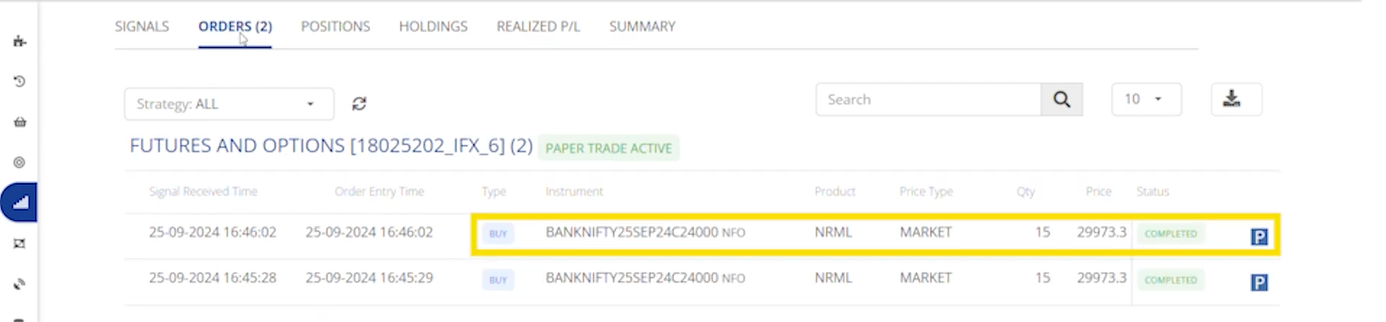
<figure><img src="https://3325206621-files.gitbook.io/~/files/v0/b/gitbook-x-prod.appspot.com/o/spaces%2FVBwGEcLA1yP8wEVFrXXf%2Fuploads%2FvOT1zVzO1gSbKv40jPGc%2Fimage.png?alt=media&#x26;token=1889875a-f535-44ef-bb7f-8bf96c8d30ce" alt=""><figcaption><p>Orders</p></figcaption></figure>

The Order tab Updates with a second buy order.

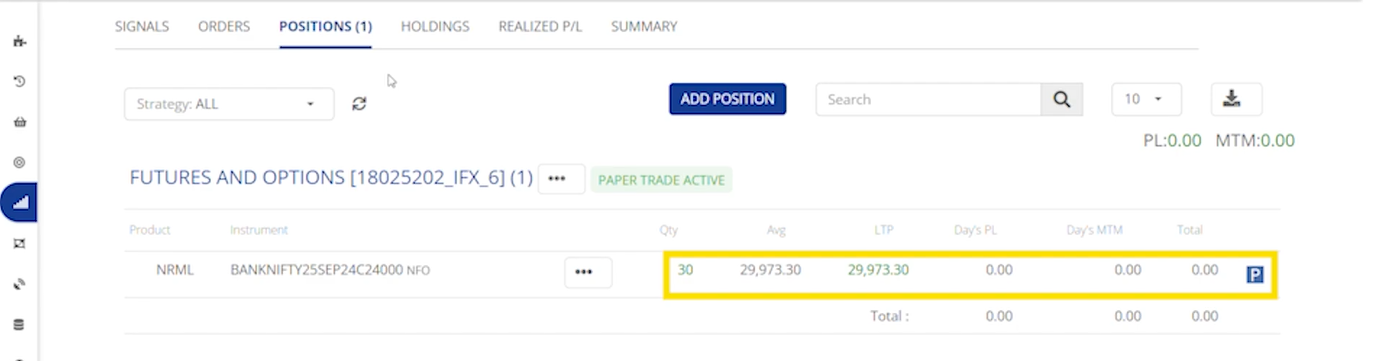
<figure><img src="https://3325206621-files.gitbook.io/~/files/v0/b/gitbook-x-prod.appspot.com/o/spaces%2FVBwGEcLA1yP8wEVFrXXf%2Fuploads%2FGW3fMDsiRIdFlFtzERlj%2Fimage.png?alt=media&#x26;token=5636c21b-6227-4ebc-90d9-ed6bac7ad20f" alt=""><figcaption><p>Positions</p></figcaption></figure>

The Positions tab shows a total of two long lots of BankNifty call option.&#x20;

**Sell :**&#x20;

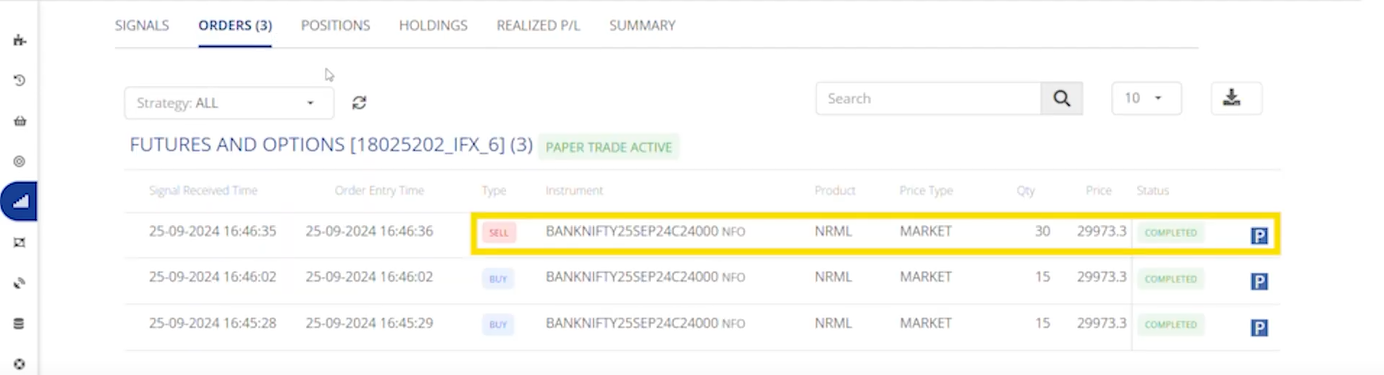
<figure><img src="https://3325206621-files.gitbook.io/~/files/v0/b/gitbook-x-prod.appspot.com/o/spaces%2FVBwGEcLA1yP8wEVFrXXf%2Fuploads%2FHcWa0wlZLSAwWWxGSyyl%2Fimage.png?alt=media&#x26;token=a8091db2-ec68-46ea-97be-01cc457a1428" alt=""><figcaption><p>Orders</p></figcaption></figure>

The Orders tab shows a sell order, and this sell order will exit the existing long call position.

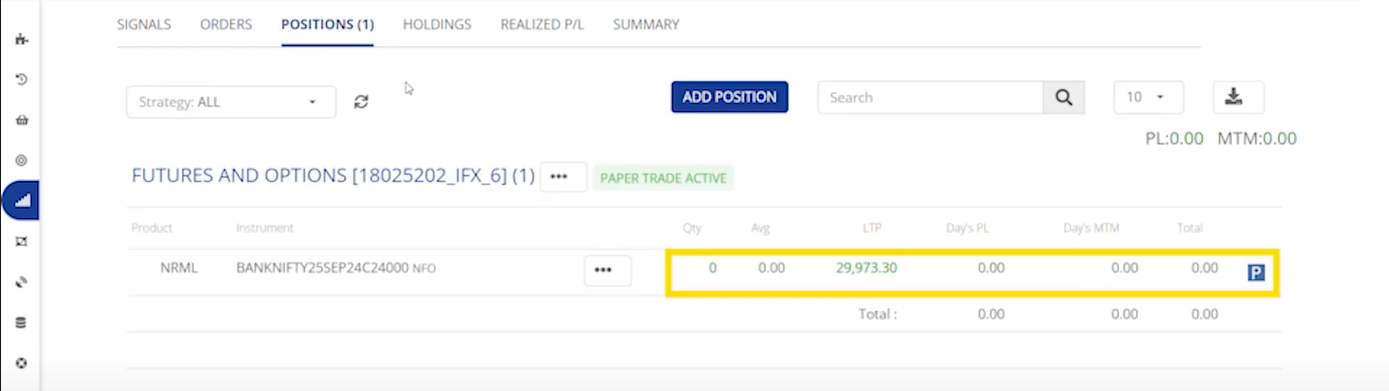
<figure><img src="https://3325206621-files.gitbook.io/~/files/v0/b/gitbook-x-prod.appspot.com/o/spaces%2FVBwGEcLA1yP8wEVFrXXf%2Fuploads%2Fa7WDOSQipoi31piQwy4W%2Fimage.png?alt=media&#x26;token=3cfe84e9-e186-4f59-8551-20b3c2494b49" alt=""><figcaption><p>Positions</p></figcaption></figure>

Under the Positions tab, you will see that the BankNifty long call position has been squared off.

## ***Options Dynamic***

&#x20;***Buying***

<table data-header-hidden><thead><tr><th width="161">Signal Action</th><th width="236"></th><th width="274"></th></tr></thead><tbody><tr><td> <strong>Order action</strong> </td><td>BUY</td><td>SELL</td></tr><tr><td><strong>Signal Type</strong> </td><td>Call Position Entry</td><td>Call Position Exit</td></tr><tr><td><strong>Order type</strong></td><td>Entry CE Order</td><td>Exit CE Order</td></tr><tr><td><strong>Position check</strong></td><td>No</td><td>Yes(CE)</td></tr><tr><td><strong>Remarks</strong></td><td>No Square-off Qyt</td><td>If No CE Positions, No Order will be Placed</td></tr></tbody></table>

Example :&#x20;

{% embed url="<https://www.youtube.com/watch?v=Lsocxdr5IB0>" %}

**Buy :**&#x20;

<figure><img src="https://3325206621-files.gitbook.io/~/files/v0/b/gitbook-x-prod.appspot.com/o/spaces%2FVBwGEcLA1yP8wEVFrXXf%2Fuploads%2FXAUPuj5OrCeAHTsesvhr%2Fimage.png?alt=media&#x26;token=7a97209e-8db7-4248-8e9b-d9d85cdca278" alt=""><figcaption><p>Orders</p></figcaption></figure>

The Orders tab displays the instrument symbol and indicates that a Call option has been bought.

<figure><img src="https://3325206621-files.gitbook.io/~/files/v0/b/gitbook-x-prod.appspot.com/o/spaces%2FVBwGEcLA1yP8wEVFrXXf%2Fuploads%2FVv399MMVVTJABo13bzfI%2Fimage.png?alt=media&#x26;token=2cfa4350-70c5-4540-9ad6-18a7dca4cf7e" alt=""><figcaption><p>Positions</p></figcaption></figure>

The Positions tab shows that we have a long position of 1 lot of Nifty call options.

**Second Buy :**&#x20;

<figure><img src="https://3325206621-files.gitbook.io/~/files/v0/b/gitbook-x-prod.appspot.com/o/spaces%2FVBwGEcLA1yP8wEVFrXXf%2Fuploads%2F78kTKbxH7sJA1xIiB1zY%2Fimage.png?alt=media&#x26;token=1974aed4-0c70-468c-847e-04407fb8e8e3" alt=""><figcaption><p>Orders</p></figcaption></figure>

This will update the Orders tab with a second buy order.

<figure><img src="https://3325206621-files.gitbook.io/~/files/v0/b/gitbook-x-prod.appspot.com/o/spaces%2FVBwGEcLA1yP8wEVFrXXf%2Fuploads%2FPQyuGhfQ1W7M1h5J9nWc%2Fimage.png?alt=media&#x26;token=18857b5a-2877-40c3-a5cf-ae4b5b24c546" alt=""><figcaption><p>Positions</p></figcaption></figure>

This will update the Positions tab to show a total of two lots of nifty call option.

**Sell :**&#x20;

<figure><img src="https://3325206621-files.gitbook.io/~/files/v0/b/gitbook-x-prod.appspot.com/o/spaces%2FVBwGEcLA1yP8wEVFrXXf%2Fuploads%2FZt2tZMpdIvoFOe5JTqEq%2Fimage.png?alt=media&#x26;token=7b1ec546-f1d1-4d72-bd3d-67f1ac4cc829" alt=""><figcaption><p>Orders</p></figcaption></figure>

The Orders tab displays a sell order, the sell order exits the existing call position.

<figure><img src="https://3325206621-files.gitbook.io/~/files/v0/b/gitbook-x-prod.appspot.com/o/spaces%2FVBwGEcLA1yP8wEVFrXXf%2Fuploads%2F51MErffz8qtDFn9caAFD%2Fimage.png?alt=media&#x26;token=42f1804c-f582-4061-8c2f-47302c72f0df" alt=""><figcaption><p>Positions</p></figcaption></figure>

Under the Positions tab, you will see that the Nifty call position has been squared off.

***Selling***

<table data-header-hidden><thead><tr><th width="161"></th><th width="174"></th><th width="340"></th></tr></thead><tbody><tr><td><strong>Signal Action</strong> </td><td>BUY</td><td>SELL</td></tr><tr><td><strong>Signal Type</strong> </td><td>Put Position Entry</td><td>Put Position Exit</td></tr><tr><td><strong>Order action</strong></td><td>SELL</td><td>BUY</td></tr><tr><td><strong>Order type</strong></td><td>Entry PE Order</td><td>Exit PE Order</td></tr><tr><td><strong>Position check</strong></td><td>No</td><td>Yes(PE)</td></tr><tr><td><strong>Square-off Qty</strong></td><td>Not Available</td><td>If No PE Positions, No Order will be Placed</td></tr></tbody></table>

Example :&#x20;

{% embed url="<https://youtu.be/ziIKDhvyfNo>" %}

**Buy :**&#x20;

<figure><img src="https://3325206621-files.gitbook.io/~/files/v0/b/gitbook-x-prod.appspot.com/o/spaces%2FVBwGEcLA1yP8wEVFrXXf%2Fuploads%2F8eqXUNt2fRmj6OsNmMzY%2Fimage.png?alt=media&#x26;token=0345cb3a-94fc-47a6-842e-e699740478aa" alt=""><figcaption><p>Orders</p></figcaption></figure>

The Orders tab displays the instrument symbol and indicates that a put option has been sold.

<figure><img src="https://3325206621-files.gitbook.io/~/files/v0/b/gitbook-x-prod.appspot.com/o/spaces%2FVBwGEcLA1yP8wEVFrXXf%2Fuploads%2FvLmVqJhKltJrQWdPKhjP%2Fimage.png?alt=media&#x26;token=583fc107-c6e4-4ad9-b83b-8968a3ac97bd" alt=""><figcaption><p>Positions</p></figcaption></figure>

The Positions tab shows that we have a short position of 1 lot of Nifty put options.

**Second Buy :**&#x20;

<figure><img src="https://3325206621-files.gitbook.io/~/files/v0/b/gitbook-x-prod.appspot.com/o/spaces%2FVBwGEcLA1yP8wEVFrXXf%2Fuploads%2FRN7WDA6qYrbH9pDHKaRP%2Fimage.png?alt=media&#x26;token=793dbcd5-351d-4fc1-95fa-4724c959727e" alt=""><figcaption><p>Orders</p></figcaption></figure>

This will update the Orders tab with a second buy order.

<figure><img src="https://3325206621-files.gitbook.io/~/files/v0/b/gitbook-x-prod.appspot.com/o/spaces%2FVBwGEcLA1yP8wEVFrXXf%2Fuploads%2FvthiZaE82zom6vhMBDXO%2Fimage.png?alt=media&#x26;token=598bcb38-6e83-4a0d-b36e-4798dadf4095" alt=""><figcaption><p>Positions</p></figcaption></figure>

This will update the Positions tab to show a total of two short lots of nifty put option.

**Sell :**&#x20;

<figure><img src="https://3325206621-files.gitbook.io/~/files/v0/b/gitbook-x-prod.appspot.com/o/spaces%2FVBwGEcLA1yP8wEVFrXXf%2Fuploads%2FJosV3RG62HdRShpRr3Wf%2Fimage.png?alt=media&#x26;token=4f96d963-389d-4440-8a83-5901e16ea44c" alt=""><figcaption><p>Orders</p></figcaption></figure>

The Orders tab displays a buy order, the buy order exits the existing short put position.

<figure><img src="https://3325206621-files.gitbook.io/~/files/v0/b/gitbook-x-prod.appspot.com/o/spaces%2FVBwGEcLA1yP8wEVFrXXf%2Fuploads%2FhJKAVNJ8xqNRLMRO8yQd%2Fimage.png?alt=media&#x26;token=70243b00-7dd9-4027-aea5-8ef615517273" alt=""><figcaption><p>Positions</p></figcaption></figure>

Under the Positions tab, you will see that the Nifty put position has been squared off.

## ***Option Hedge***&#x20;

***Buying***

| **Signal Action**  | BUY                | SELL                                             |
| ------------------ | ------------------ | ------------------------------------------------ |
| **Signal Type**    | Put Position Entry | Put Position Exit                                |
| **Order Action**   | BUY                | SELL                                             |
| **Order Type**     | Entry PE Order     | Exit PE Order                                    |
| **Position Check** | No                 | Yes(PE)                                          |
| **Sqr-off Qty**    | Not Available      | If No Open PE Positions, No Order will be Placed |

Example :&#x20;

{% embed url="<https://youtu.be/lGvCqmOYOcc>" %}

**Buy :**&#x20;

<figure><img src="https://3325206621-files.gitbook.io/~/files/v0/b/gitbook-x-prod.appspot.com/o/spaces%2FVBwGEcLA1yP8wEVFrXXf%2Fuploads%2Fck6R6elPgRi4afW0PweC%2Fimage.png?alt=media&#x26;token=37632f3d-8327-45a0-a591-1d19051a22ec" alt=""><figcaption><p>Orders</p></figcaption></figure>

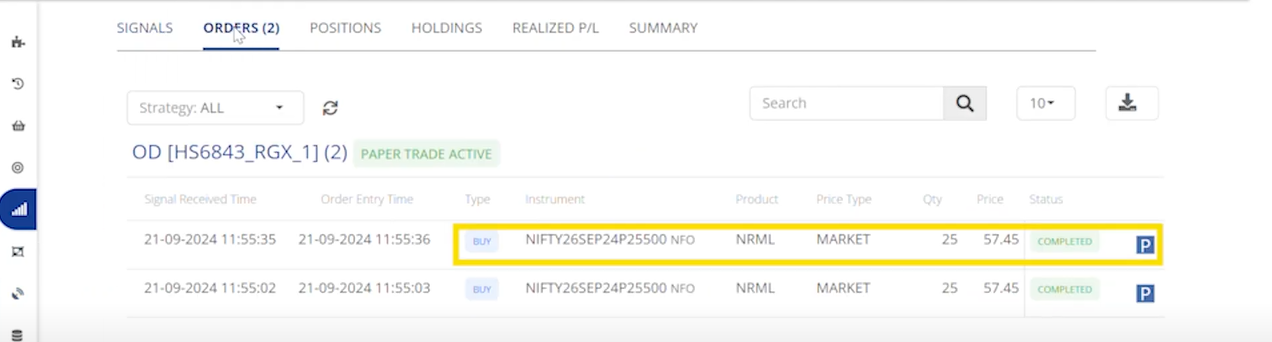
The Orders tab displays the instrument symbol and indicates that a put option has been bought.

<figure><img src="https://3325206621-files.gitbook.io/~/files/v0/b/gitbook-x-prod.appspot.com/o/spaces%2FVBwGEcLA1yP8wEVFrXXf%2Fuploads%2FsJyNOGKurowKtHO2Orcx%2Fimage.png?alt=media&#x26;token=1914996c-f027-4b3a-8b6b-5ca66aff18c6" alt=""><figcaption><p>Positions</p></figcaption></figure>

The Positions tab shows that we have a long position of 1 lot of Nifty put options.

**Second Buy :**&#x20;

<figure><img src="https://3325206621-files.gitbook.io/~/files/v0/b/gitbook-x-prod.appspot.com/o/spaces%2FVBwGEcLA1yP8wEVFrXXf%2Fuploads%2FTvG8yu3vUKSUlv6HTOng%2Fimage.png?alt=media&#x26;token=55e5454d-174e-4038-9db8-c57ee254dfba" alt=""><figcaption><p>Orders</p></figcaption></figure>

This will update the Orders tab with a second buy order.

<figure><img src="https://3325206621-files.gitbook.io/~/files/v0/b/gitbook-x-prod.appspot.com/o/spaces%2FVBwGEcLA1yP8wEVFrXXf%2Fuploads%2FVv9vsi0RNhC5hgq7K2aA%2Fimage.png?alt=media&#x26;token=631578b6-4792-4074-b8f4-16f5233da8ba" alt=""><figcaption><p>Positions</p></figcaption></figure>

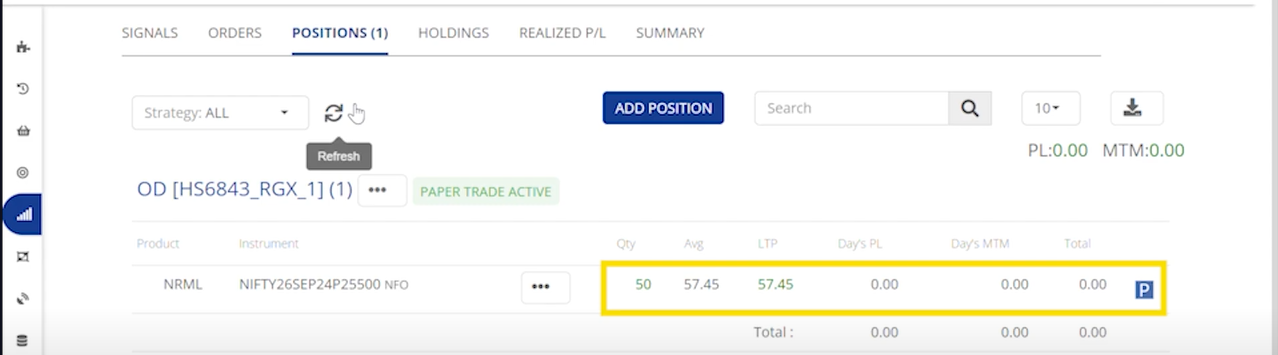
This will update the Positions tab to show a total of two lots of nifty put option.

**Sell :**&#x20;

<figure><img src="https://3325206621-files.gitbook.io/~/files/v0/b/gitbook-x-prod.appspot.com/o/spaces%2FVBwGEcLA1yP8wEVFrXXf%2Fuploads%2F9C1PB5VbU2beSjf0Lsi5%2Fimage.png?alt=media&#x26;token=197f3a6d-ebe5-4bce-b4c4-3197cf40fbee" alt=""><figcaption><p>Orders</p></figcaption></figure>

The Orders tab displays a sell order, the sell order exits the existing put position.&#x20;

<figure><img src="https://3325206621-files.gitbook.io/~/files/v0/b/gitbook-x-prod.appspot.com/o/spaces%2FVBwGEcLA1yP8wEVFrXXf%2Fuploads%2FI3ybghmjP9bdFgcIfdaj%2Fimage.png?alt=media&#x26;token=b49c604c-36ca-418b-863f-140ed15bc2f7" alt=""><figcaption><p>Positions</p></figcaption></figure>

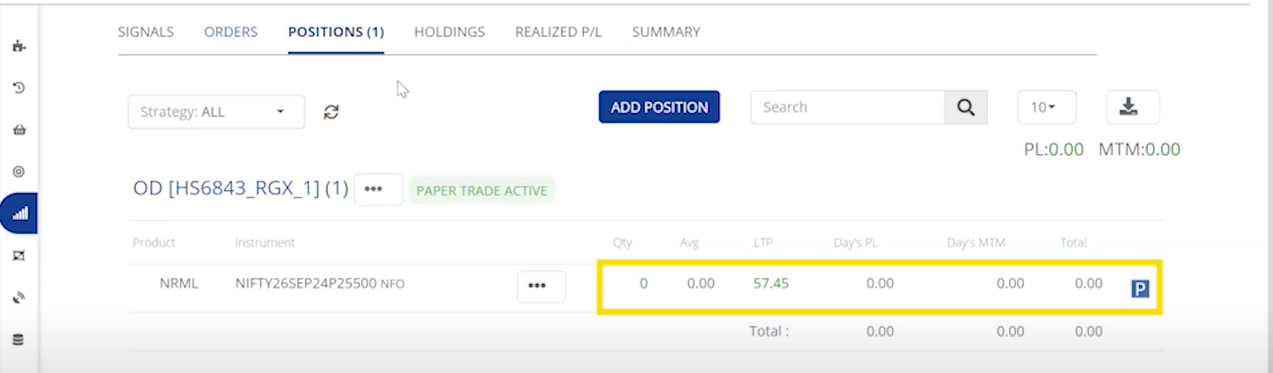
Under the Positions tab, you will see that the Nifty put position has been squared off.

***Selling***

| **Signal Action**  | BUY            | SELL                                             |
| ------------------ | -------------- | ------------------------------------------------ |
| **Signal Type**    | CE Entry       | CE Exit                                          |
| **Order Action**   | SELL           | BUY                                              |
| **Order Type**     | Entry CE Order | Exit CE Order                                    |
| **Position Check** | No             | Yes(CE)                                          |
| **Sqr-off Qty**    | Not Available  | If No Open CE Positions, No Order will be Placed |

Example :&#x20;

{% embed url="<https://youtu.be/5CoquSXsehw>" %}

**Buy :**&#x20;

<figure><img src="https://3325206621-files.gitbook.io/~/files/v0/b/gitbook-x-prod.appspot.com/o/spaces%2FVBwGEcLA1yP8wEVFrXXf%2Fuploads%2F8MgSfa7vayr49oOdITTU%2Fimage.png?alt=media&#x26;token=08aa10ea-e466-4afa-a2e9-a9e959c6ac6d" alt=""><figcaption><p>Orders</p></figcaption></figure>

The Orders tab displays the instrument symbol and indicates that a call option has been sold.

<figure><img src="https://3325206621-files.gitbook.io/~/files/v0/b/gitbook-x-prod.appspot.com/o/spaces%2FVBwGEcLA1yP8wEVFrXXf%2Fuploads%2F2bLwCSRh7s4av2PGbc1h%2Fimage.png?alt=media&#x26;token=c9242850-542d-45b8-a3dd-f195572f1a68" alt=""><figcaption><p>Positions</p></figcaption></figure>

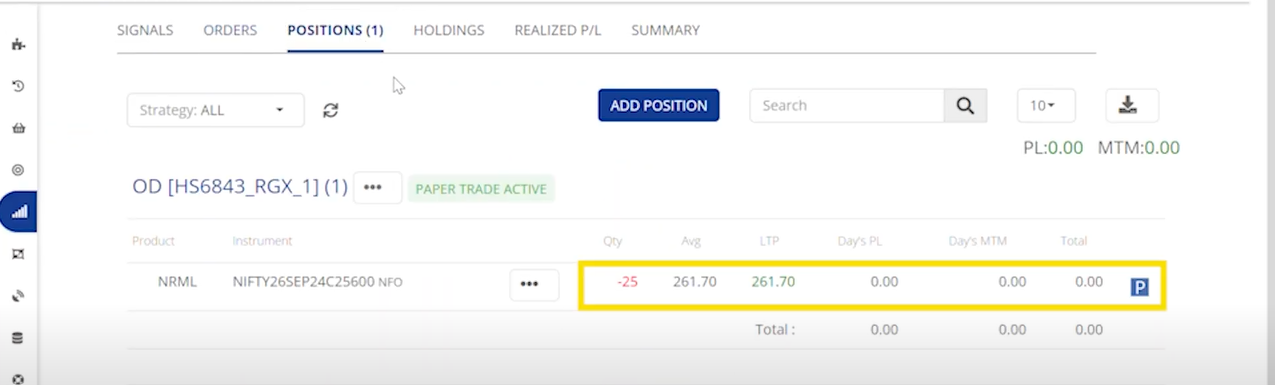
The Positions tab shows that we have a short position of 1 lot of Nifty call options.

**Second Buy :**&#x20;

<figure><img src="https://3325206621-files.gitbook.io/~/files/v0/b/gitbook-x-prod.appspot.com/o/spaces%2FVBwGEcLA1yP8wEVFrXXf%2Fuploads%2FjUpgFJydEPCbzy40EMH3%2Fimage.png?alt=media&#x26;token=88c0a740-9f39-48c7-97f8-5585b85da4d0" alt=""><figcaption><p>Orders</p></figcaption></figure>

It will update the Orders tab with a second buy order.

<figure><img src="https://3325206621-files.gitbook.io/~/files/v0/b/gitbook-x-prod.appspot.com/o/spaces%2FVBwGEcLA1yP8wEVFrXXf%2Fuploads%2Fh6PItNvwBEnZK9RMiybF%2Fimage.png?alt=media&#x26;token=ff025ddb-9ec5-4f6c-8d9f-3b114e803063" alt=""><figcaption><p>Positions</p></figcaption></figure>

It will update the Positions tab to show a total of two short lots of nifty call option.

**Sell :**&#x20;

<figure><img src="https://3325206621-files.gitbook.io/~/files/v0/b/gitbook-x-prod.appspot.com/o/spaces%2FVBwGEcLA1yP8wEVFrXXf%2Fuploads%2F8I2TVPoK76nEc7W3ebZS%2Fimage.png?alt=media&#x26;token=8865f83c-f909-4c43-8e3c-1422a94f1d50" alt=""><figcaption><p>Orders</p></figcaption></figure>

The Orders tab displays a buy order, the buy order exits the existing short call position.

<figure><img src="https://3325206621-files.gitbook.io/~/files/v0/b/gitbook-x-prod.appspot.com/o/spaces%2FVBwGEcLA1yP8wEVFrXXf%2Fuploads%2F8XMyURPoCCPiZZZlq9cG%2Fimage.png?alt=media&#x26;token=cca0f898-8faf-4fe9-8133-fc3fb0b7fcc4" alt=""><figcaption><p>Positions</p></figcaption></figure>

Under the Positions tab, you will see that the Nifty call position has been squared off.&#x20;