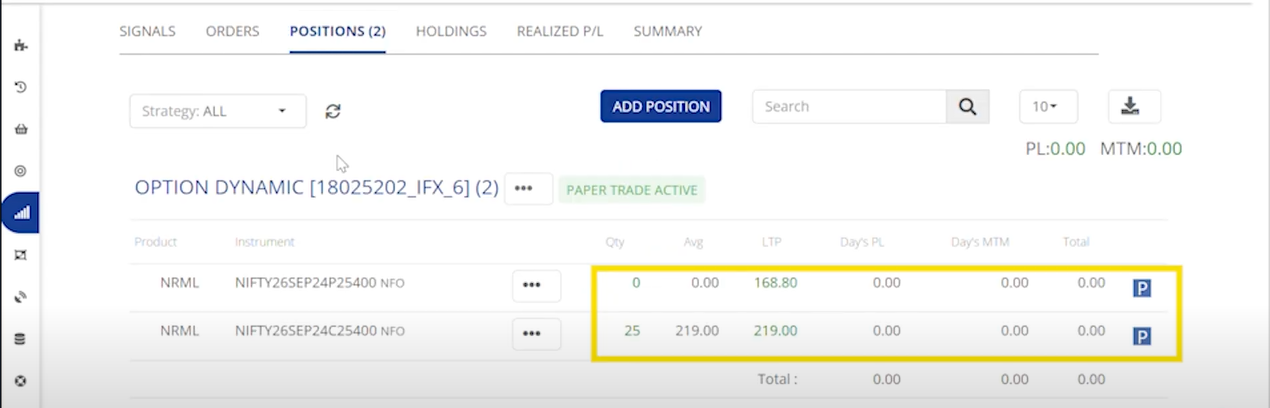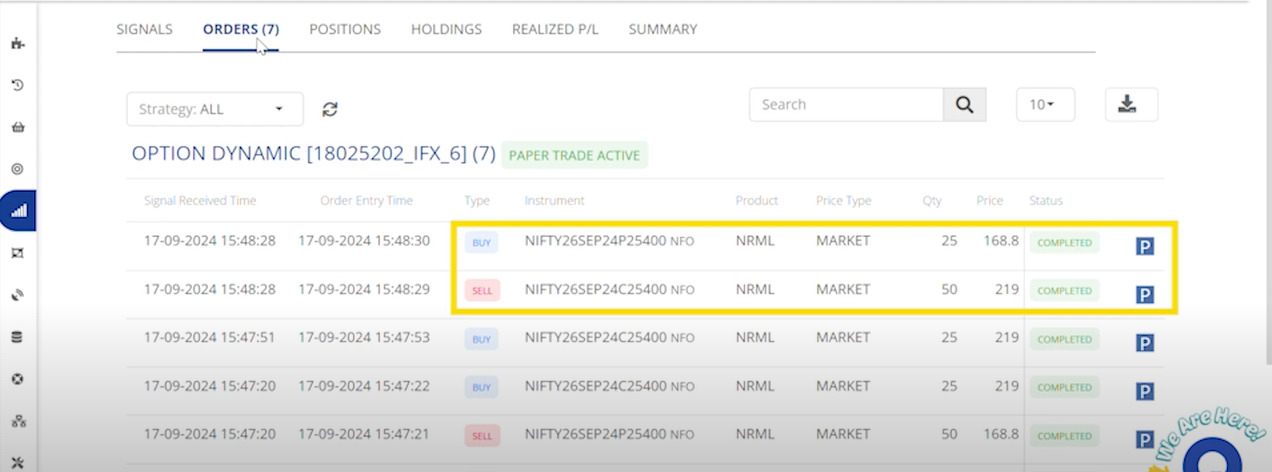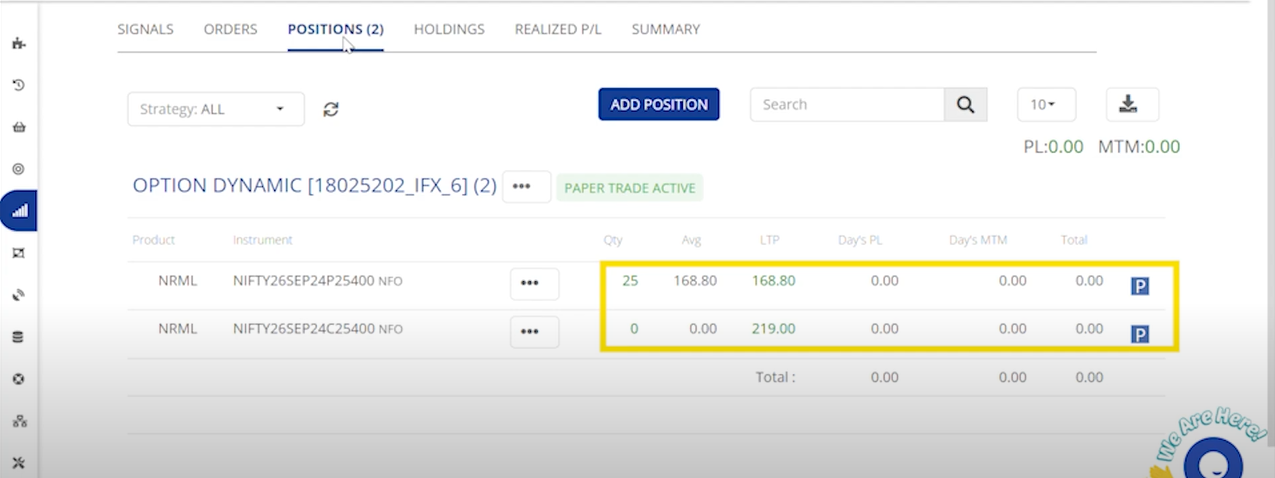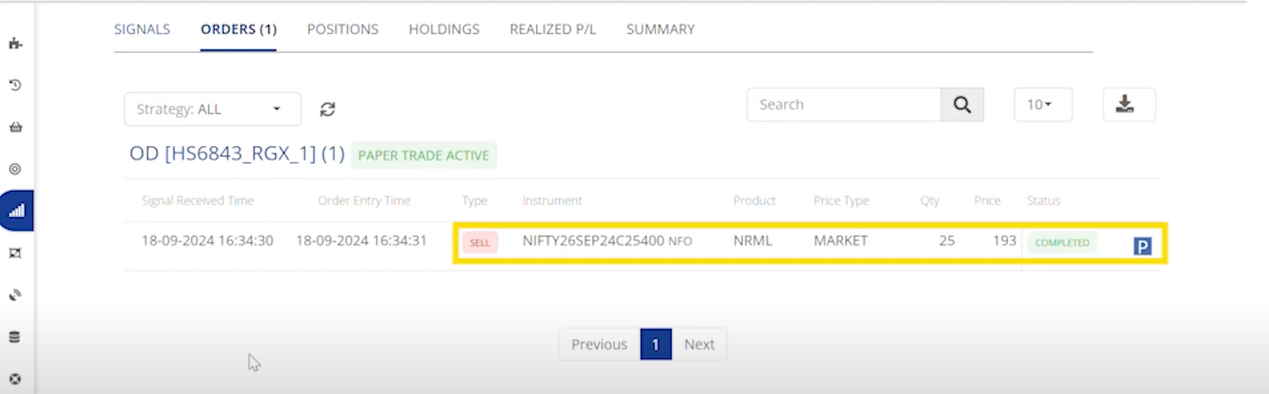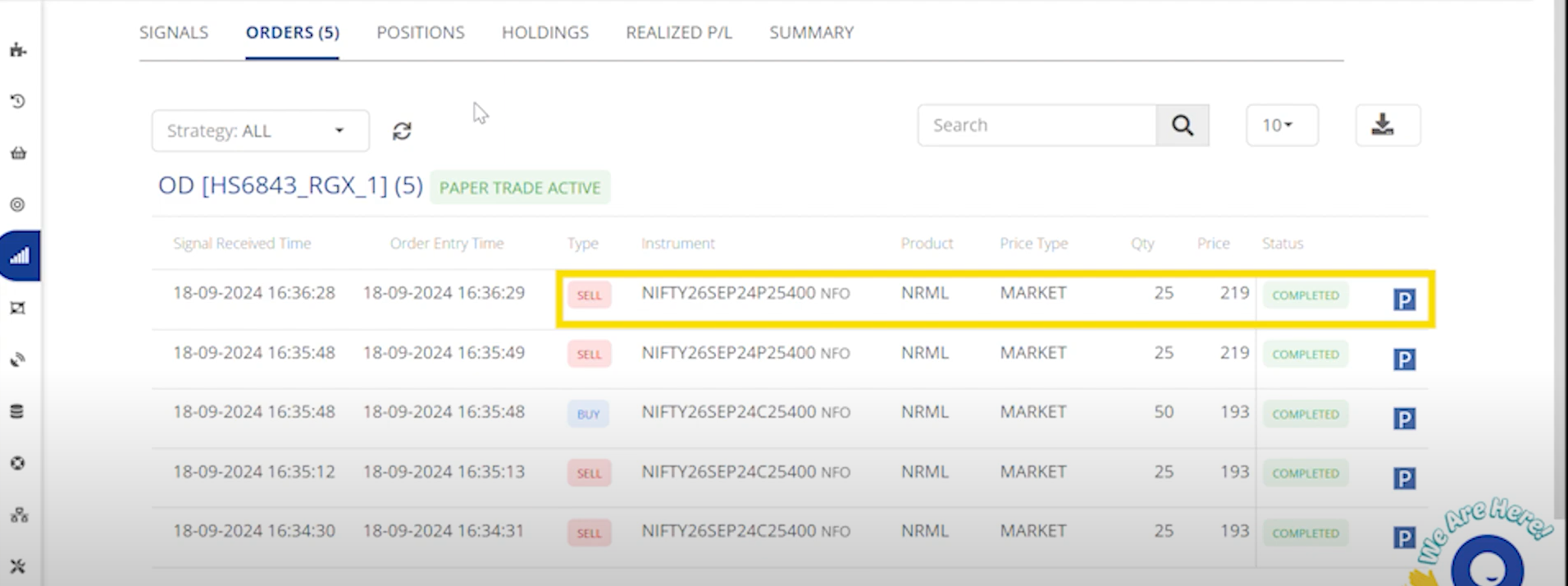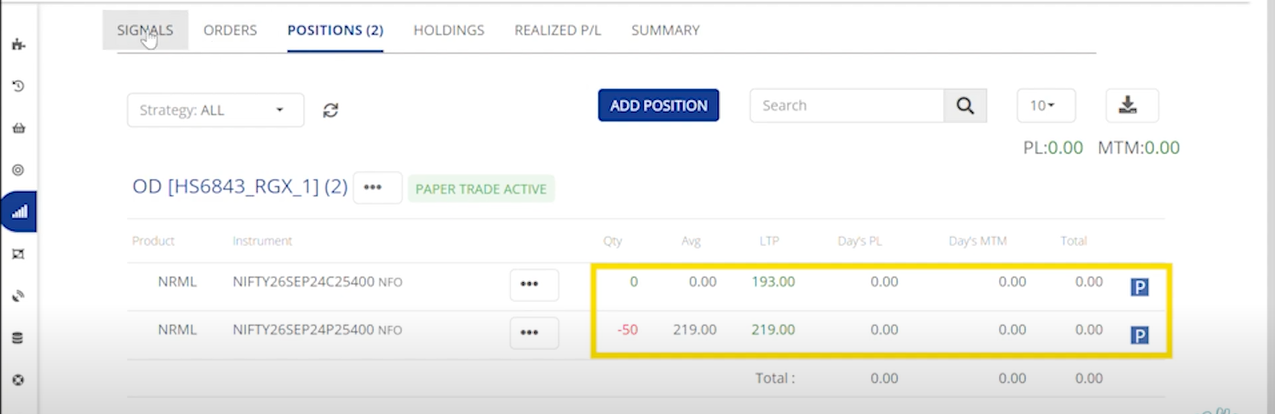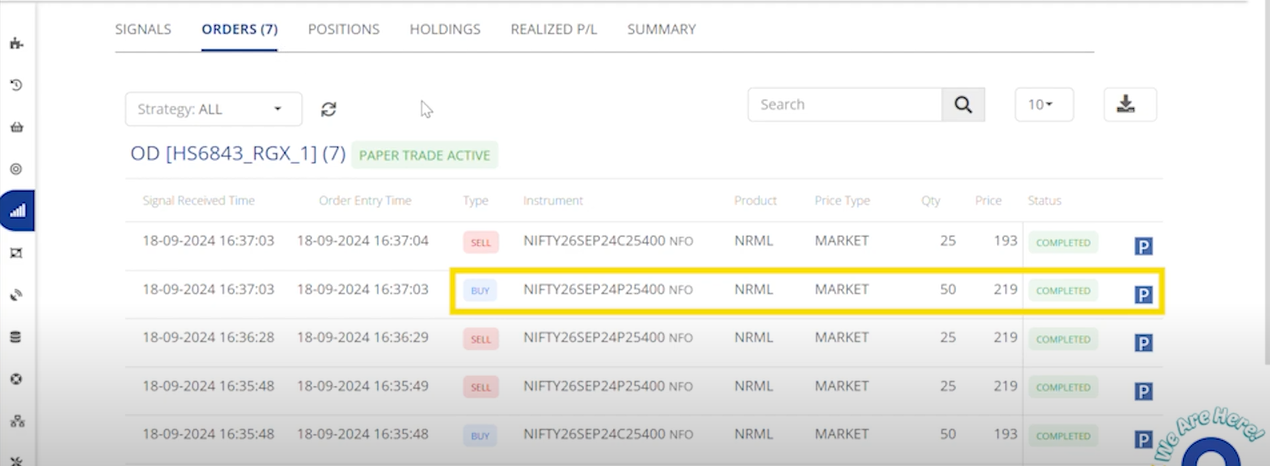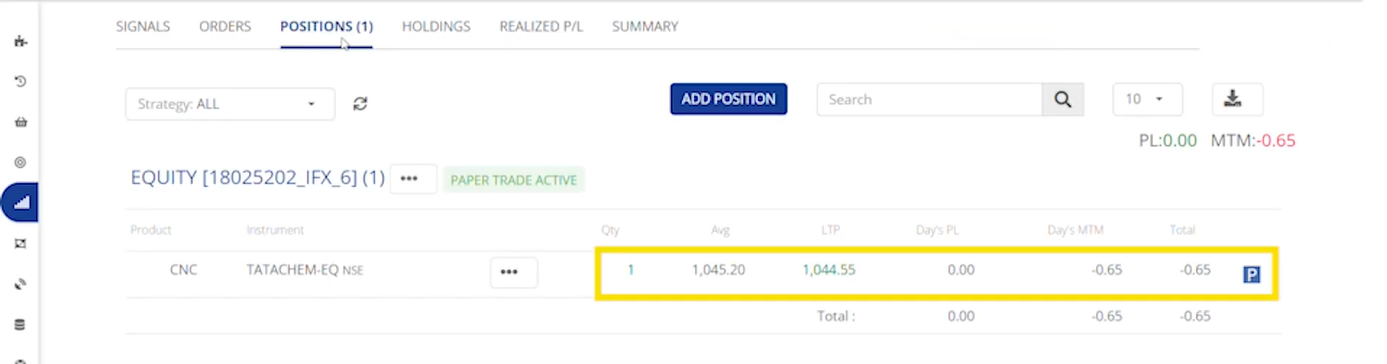
# STOP + REVERSAL

### *Equity*

| **Signal Action**  | BUY                                                     | SELL                                                    | SHORT                                                   | COVER                                                   |
| ------------------ | ------------------------------------------------------- | ------------------------------------------------------- | ------------------------------------------------------- | ------------------------------------------------------- |
| **Signal Type**    | <p>Short Position Exit & </p><p>Long Position Entry</p> | <p>Long Position Exit & </p><p>Short Position Entry</p> | <p>Long Position Exit & </p><p>Short Position Entry</p> | <p>Short Position Exit & </p><p>Long Position Entry</p> |
| **Order Action**   | BUY+BUY                                                 | SELL+SELL                                               | SELL+SELL                                               | BUY+BUY                                                 |
| **Order Type**     | <p>Exit + </p><p>Entry Order</p>                        | <p>Exit + </p><p>Entry Order</p>                        | <p>Exit + </p><p>Entry Order</p>                        | <p>Exit + </p><p>Entry Order</p>                        |
| **Position Check** | Yes(Short)                                              | Yes(Long)                                               | Yes(Long)                                               | Yes(Short)                                              |
| **Sqr-Off Qty**    | If No Open Short Positions, Long Entry will be Placed   | If No Open Long Positions, Short Entry will be Placed   | If No Open Long Positions, Short Entry will be Placed   | If No Open Short Positions, Long Entry will be Placed   |

Example :&#x20;

{% embed url="<https://www.youtube.com/watch?v=Hyk4n2nVBTg>" %}

**Buy :**&#x20;

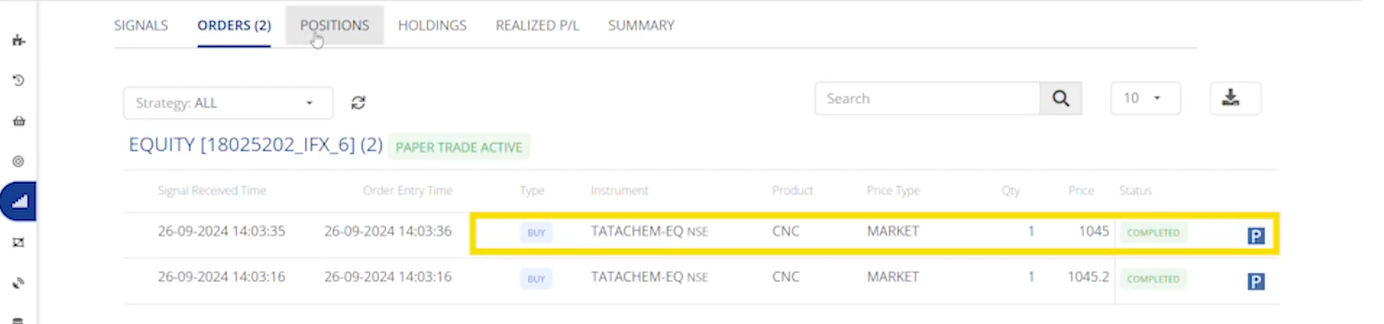
<figure><img src="/files/GYYC4NDl1BodAAvP5g2I" alt=""><figcaption><p>Orders</p></figcaption></figure>

The Orders tab displays the instrument symbol and indicates that one quantity of long equity position has been bought. here the instrument symbol depicts that we have placed a order for Tata chemical.

<figure><img src="/files/VCBnSLJI0ObIIm2NbdPF" alt=""><figcaption><p>Positions</p></figcaption></figure>

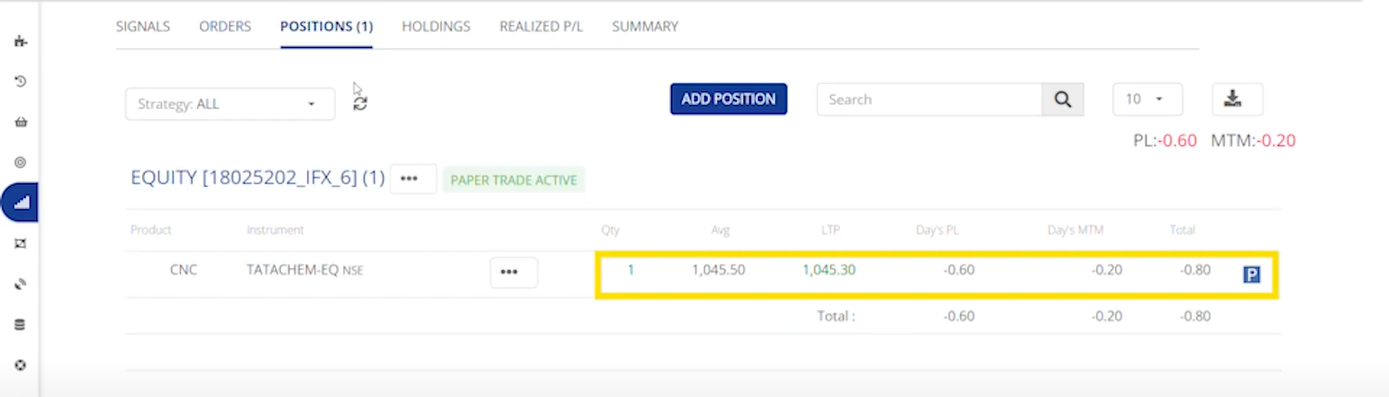
The Positions tab indicates that we hold a long equity position of one share in Tata Chemical. Since there’s no short position to close, only the long position is executed.

**Second Buy :**  &#x20;

<figure><img src="/files/EQMFimDFLu0nI4VLcZ36" alt=""><figcaption><p>Orders</p></figcaption></figure>

The Order tab Updates with a second buy order.

<figure><img src="/files/9ePqtRbXR5h8CPr2x9ZU" alt=""><figcaption><p>Positions</p></figcaption></figure>

The Positions tab shows a total of two long shares of tata chemical equity.

**Sell :**&#x20;

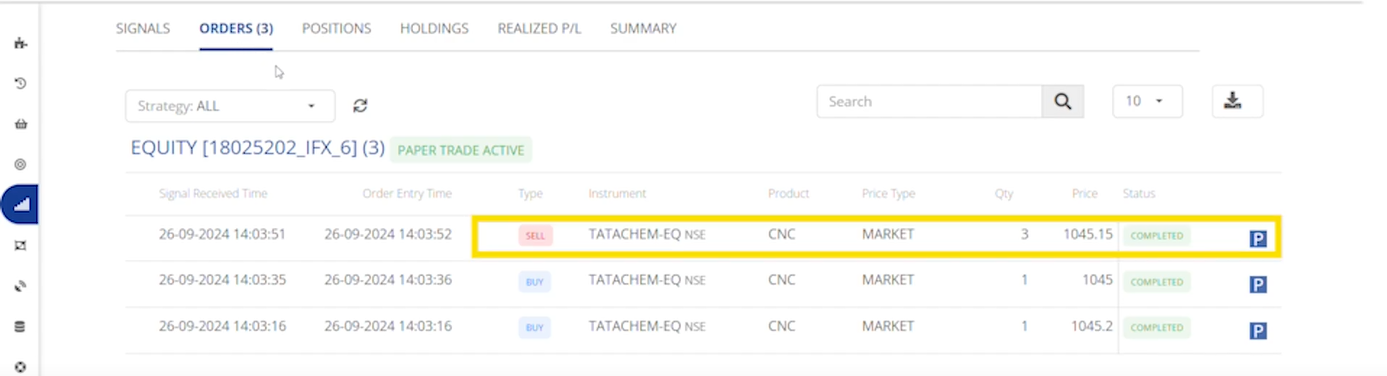
<figure><img src="/files/wIt3xhk7jXKbUkrUgHKC" alt=""><figcaption><p>Orders</p></figcaption></figure>

The Orders tab shows a sell order of total three shares, and this sell order will exit the existing long equity position while creating a short position of one share in Tata Chemical Equity.&#x20;

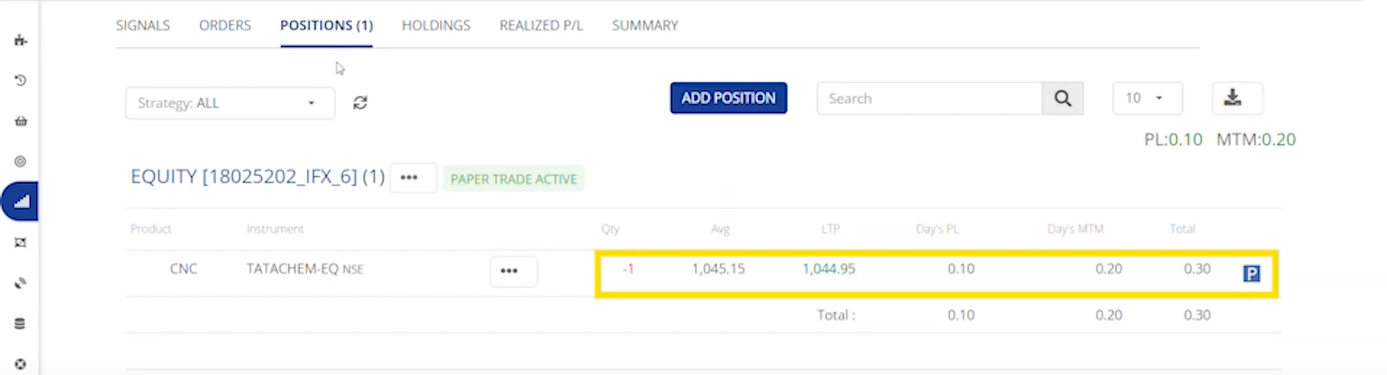
<figure><img src="/files/wP3rks957zwNV1rf5kXx" alt=""><figcaption><p>Positions</p></figcaption></figure>

Under the Positions tab, you will see that the long Tata Chemical Equity position has been squared off, and a short position is created.

**Short :**&#x20;

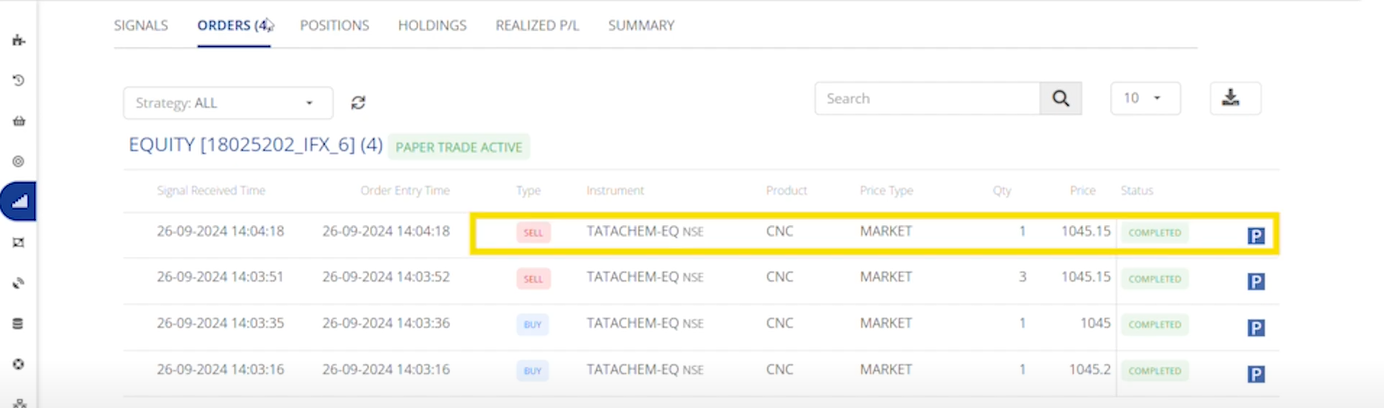
<figure><img src="/files/a2mSR79mFwxt9MPXRFNK" alt=""><figcaption><p>Orders</p></figcaption></figure>

This will create a sell order for one share of Tata Chemical Equity in the Orders tab.

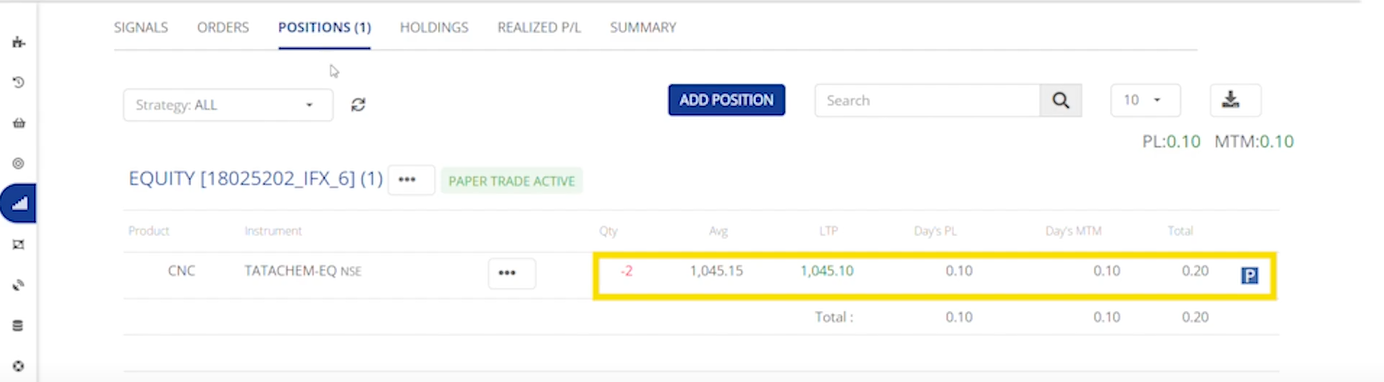
<figure><img src="/files/PiEyyYwiJ7ptXeBDXKDQ" alt=""><figcaption><p>Positions</p></figcaption></figure>

In the Positions tab, you’ll see a total of two short shares of Tata Chemical Equity.

**Cover :**&#x20;

<figure><img src="/files/YRTdZik8YvQrDAnqGvoj" alt=""><figcaption><p>Orders</p></figcaption></figure>

This will create a buy order for three shares of Tata Chemical Equity in the Orders tab according to the stop + reversal strategy.

<figure><img src="/files/QPACVcai5zxoqCxw0njD" alt=""><figcaption><p>Positions</p></figcaption></figure>

Under the Positions tab, you will see that the short Tata Chemical Equity position has been squared off, and a long position is created.

### *Futures*

| **Signal Action**  | BUY                                                     | SELL                                                    | SHORT                                                   | COVER                                                   |
| ------------------ | ------------------------------------------------------- | ------------------------------------------------------- | ------------------------------------------------------- | ------------------------------------------------------- |
| **Signal Type**    | <p>Short Position Exit & </p><p>Long Position Entry</p> | <p>Long Position Exit & </p><p>Short Position Entry</p> | <p>Long Position Exit & </p><p>Short Position Entry</p> | <p>Short Position Exit & </p><p>Long Position Entry</p> |
| **Order Action**   | BUY+BUY                                                 | SELL+SELL                                               | SELL+SELL                                               | BUY+BUY                                                 |
| **Order Type**     | <p>Exit + </p><p>Entry Order</p>                        | <p>Exit + </p><p>Entry Order</p>                        | <p>Exit + </p><p>Entry Order</p>                        | <p>Exit + </p><p>Entry Order</p>                        |
| **Position Check** | Yes(Short)                                              | Yes(Long)                                               | Yes(Long)                                               | Yes(Short)                                              |
| **Sqr-Off Qty**    | If No Open Short Positions, Long Entry will be Placed   | If No Open Long Positions, Short Entry will be Placed   | If No Open Long Positions, Short Entry will be Placed   | If No Open Short Positions, Long Entry will be Placed   |

Example :&#x20;

<table data-header-hidden><thead><tr><th width="140"></th><th width="144"></th><th width="182"></th><th width="125"></th><th width="128"></th></tr></thead><tbody><tr><td><strong>Symbol</strong> </td><td>Reliance</td><td>Reliance</td><td>Reliance</td><td>Reliance</td></tr><tr><td><strong>Quantity (Lots)</strong></td><td>2</td><td>2</td><td>2</td><td>2</td></tr><tr><td><strong>Action</strong></td><td>BUY</td><td>SELL</td><td>SHORT</td><td>Cover</td></tr><tr><td><strong>Remarks</strong></td><td>Bought</td><td>Sold</td><td>Sold</td><td>Bought</td></tr></tbody></table>

### *Options*&#x20;

| **Signal Action**  | BUY                                                     | SELL                                                    | SHORT                                                   | COVER                                                   |
| ------------------ | ------------------------------------------------------- | ------------------------------------------------------- | ------------------------------------------------------- | ------------------------------------------------------- |
| **Signal Type**    | <p>Short Position Exit & </p><p>Long Position Entry</p> | <p>Long Position Exit & </p><p>Short Position Entry</p> | <p>Long Position Exit & </p><p>Short Position Entry</p> | <p>Short Position Exit & </p><p>Long Position Entry</p> |
| **Order Action**   | BUY+BUY                                                 | SELL+SELL                                               | SELL+SELL                                               | BUY+BUY                                                 |
| **Order Type**     | <p>Exit + </p><p>Entry Order</p>                        | <p>Exit + </p><p>Entry Order</p>                        | <p>Exit + </p><p>Entry Order</p>                        | <p>Exit + </p><p>Entry Order</p>                        |
| **Position Check** | Yes(Short)                                              | Yes(Long)                                               | Yes(Long)                                               | Yes(Short)                                              |
| **Sqr-Off Qty**    | If No Open Short Positions, Long Entry will be Placed   | If No Open Long Positions, Short Entry will be Placed   | If No Open Long Positions, Short Entry will be Placed   | If No Open Short Positions, Long Entry will be Placed   |

Example :&#x20;

{% embed url="<https://youtu.be/3nTNSShXp6Y>" %}

**Buy :**&#x20;

<figure><img src="/files/faLesh1vcYkPhAuXYOX5" alt=""><figcaption><p>Orders</p></figcaption></figure>

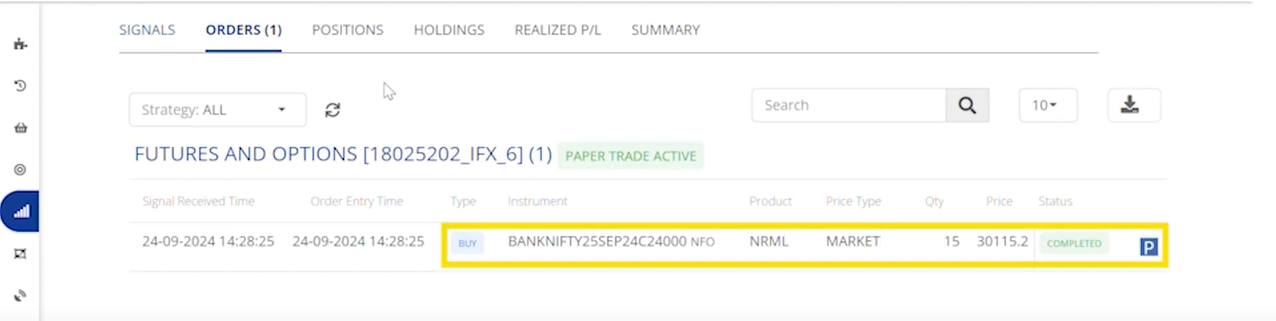
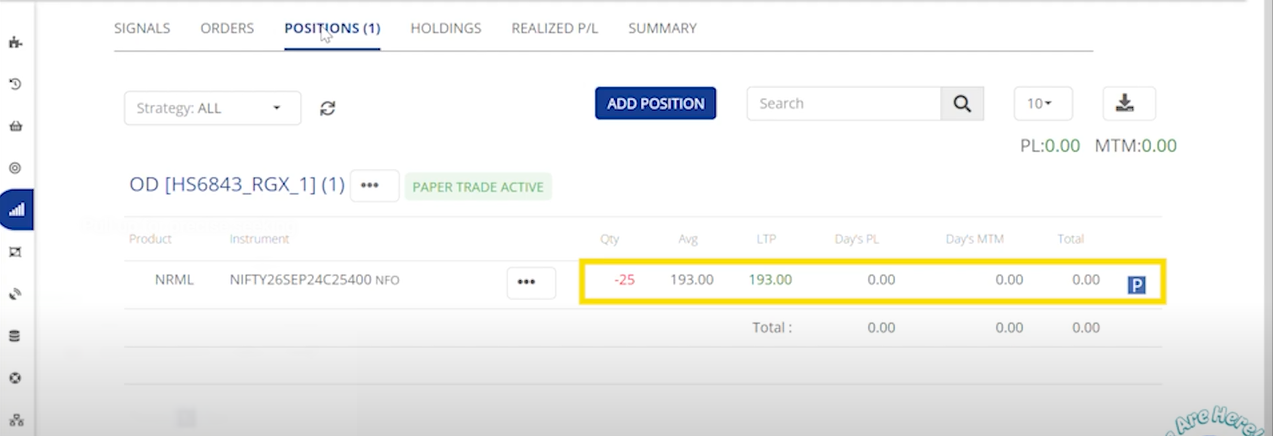
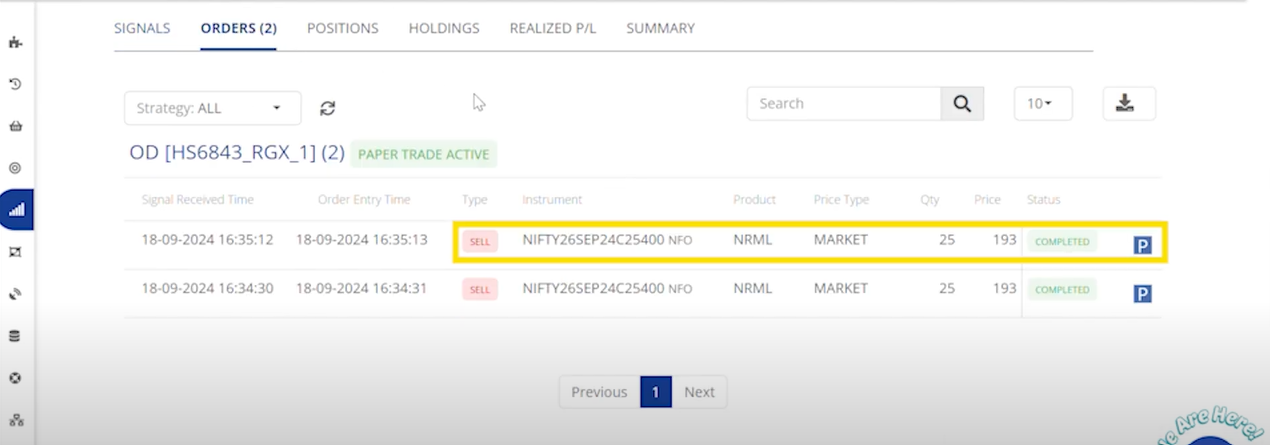
The Orders tab displays the instrument symbol and indicates that a call option has been bought. here the instrument symbol depicts that we have placed a BANKNIFTY Order.

<figure><img src="/files/lcCdnu4xV3fHkSl5etrz" alt=""><figcaption><p>Positions</p></figcaption></figure>

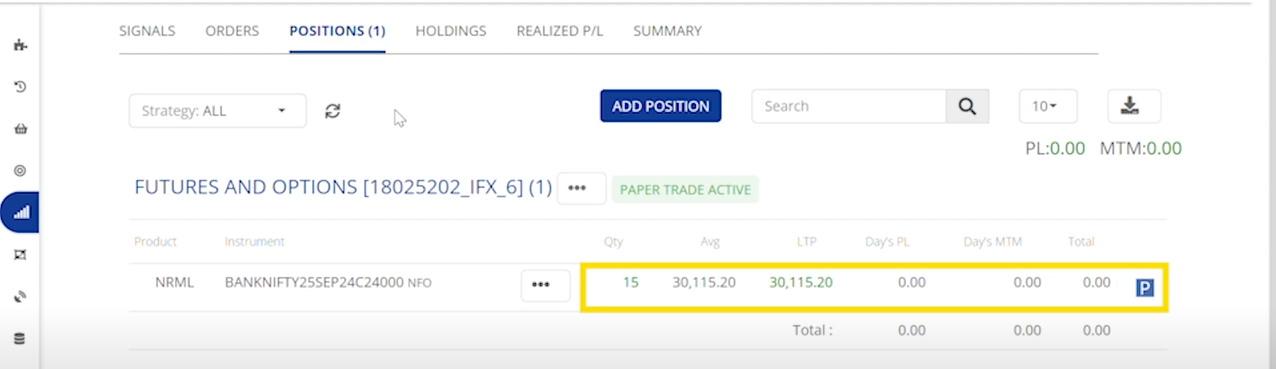
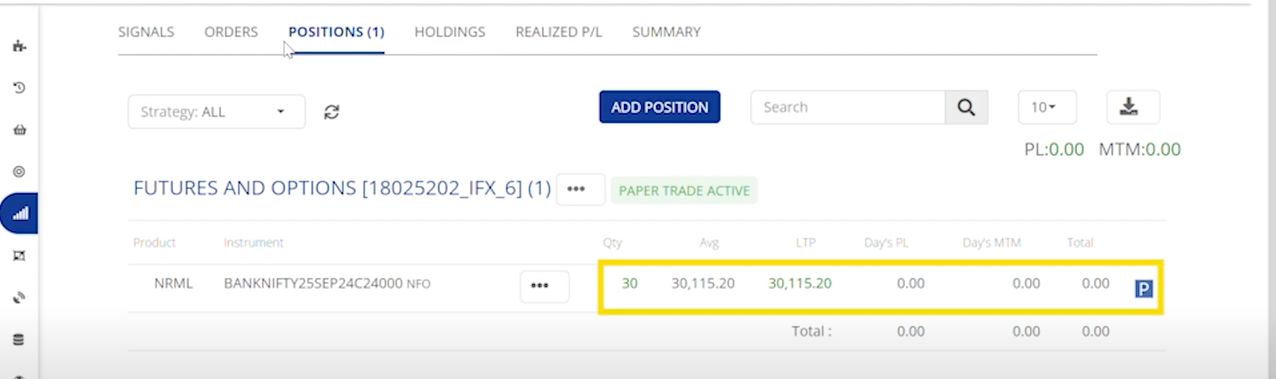
The Positions tab indicates that we hold a long position of 1 lot in BankNifty call options. Since there’s no short position to close, only the long position is executed.

**Second Buy :**&#x20;

<figure><img src="/files/GuN0BVvZ1agBEZfTHtVE" alt=""><figcaption><p>Orders</p></figcaption></figure>

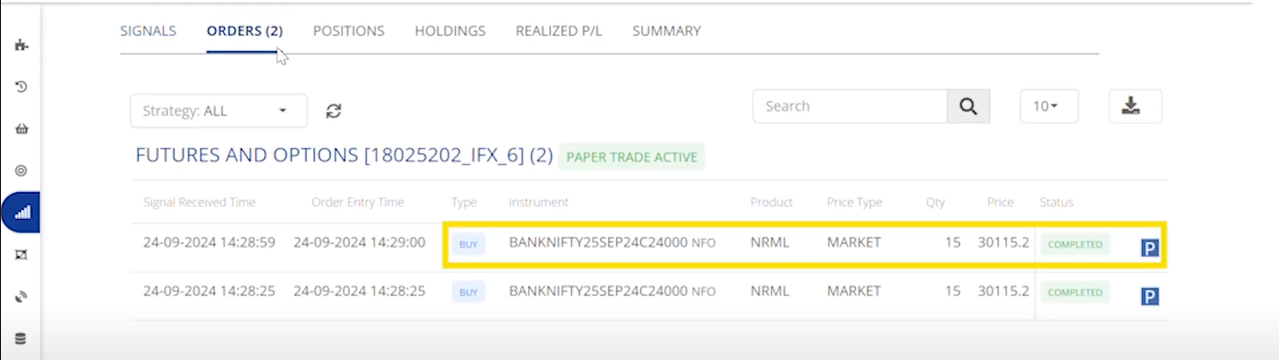
The Order tab Updates with a second buy orde&#x72;**.**

<figure><img src="/files/stCOLXRbx4jGexnXZm0Y" alt=""><figcaption><p>Positions</p></figcaption></figure>

The Positions tab shows a total of two long lots of BankNifty call option.

**Sell :** &#x20;

<figure><img src="/files/psLEneJLgFVlBlTJGVKQ" alt=""><figcaption><p>Orders</p></figcaption></figure>

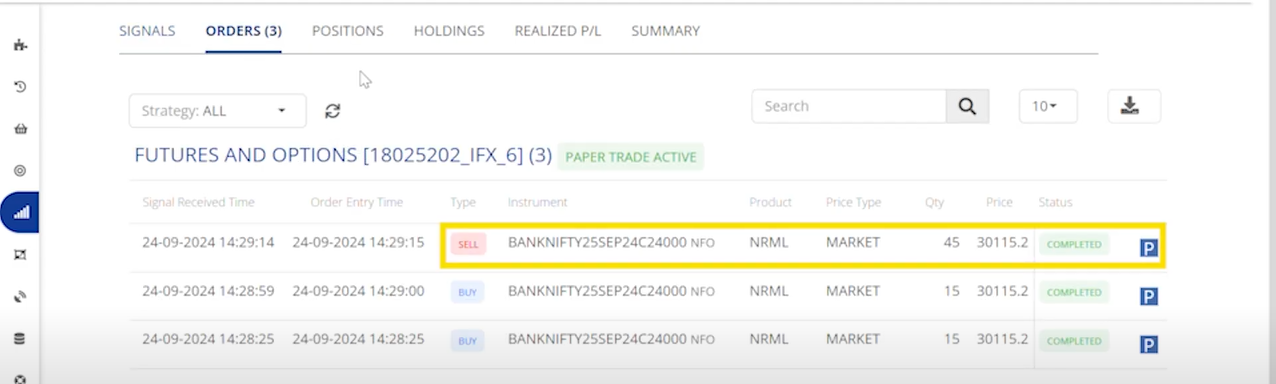
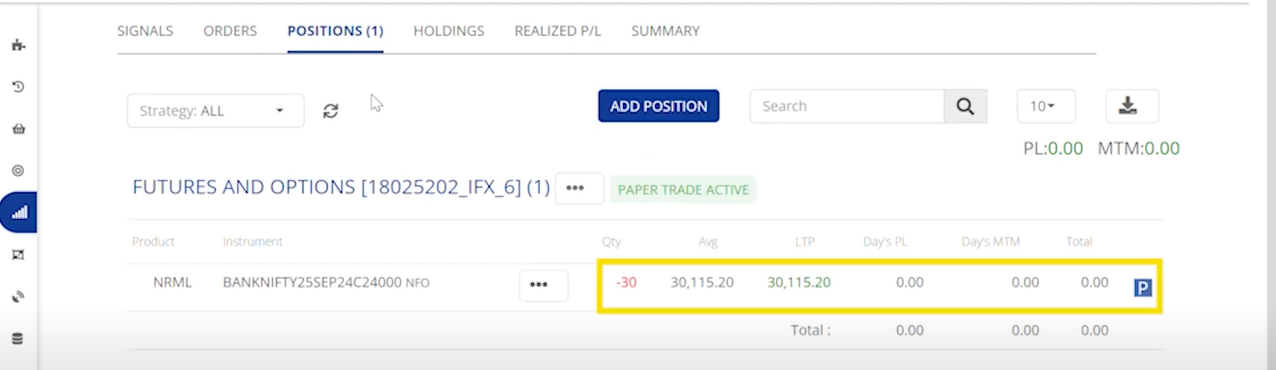
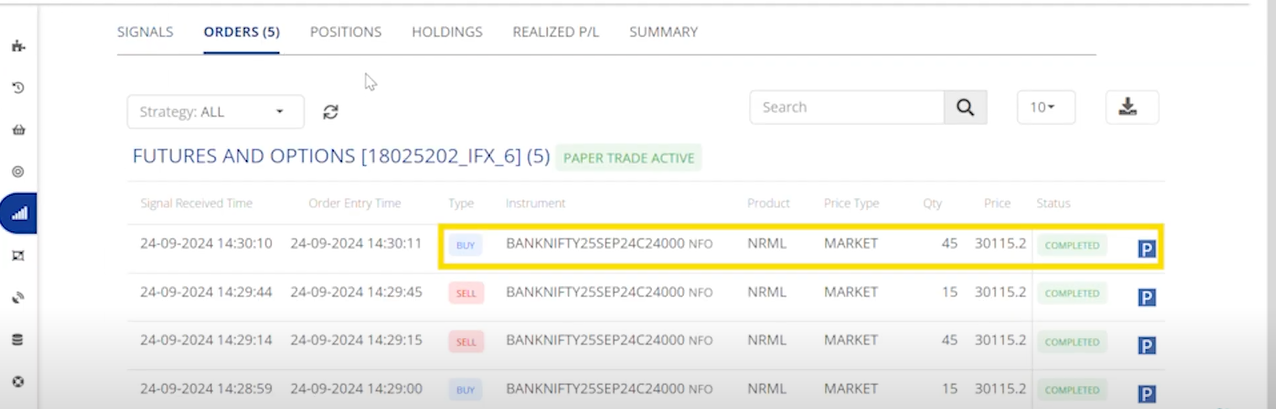
The Orders tab shows a sell order of total three lots, and this sell order will exit the existing long call position while creating a short position of one lot in BankNifty call options.

<figure><img src="/files/lg5DUXMg01OkTthJ1Uga" alt=""><figcaption><p>Positions</p></figcaption></figure>

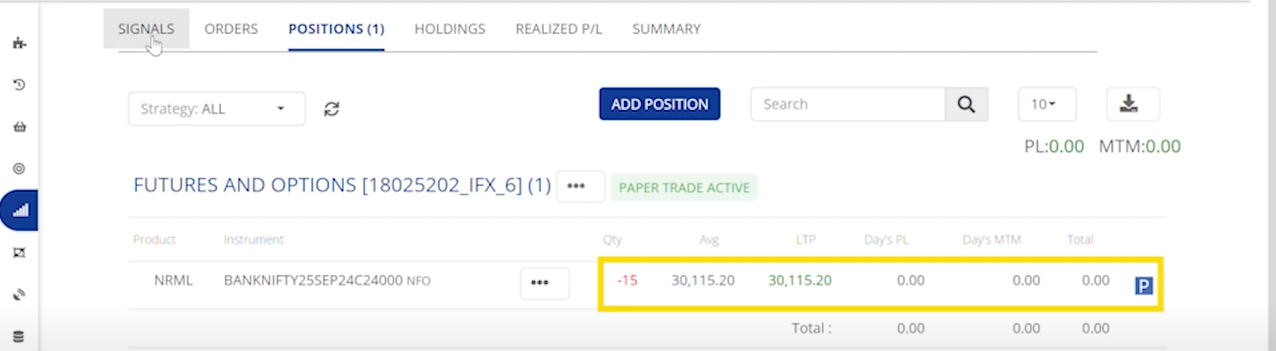
Under the Positions tab, you will see that the BankNifty long call position has been squared off, and a short position is created.

**Short :**&#x20;

<figure><img src="/files/Fq89dijUYvcrJ4FzzSn3" alt=""><figcaption><p>Orders</p></figcaption></figure>

This will create a sell order for one lot of BankNifty call options in the Orders tab.

<figure><img src="/files/4pM59fygkpzei6ndAjTf" alt=""><figcaption><p>Positions</p></figcaption></figure>

In the Positions tab, you’ll see a total of two short lots of BankNifty call options.

**Cover :**&#x20;

<figure><img src="/files/366wK6mUuK6wNFEPAlyR" alt=""><figcaption><p>Orders</p></figcaption></figure>

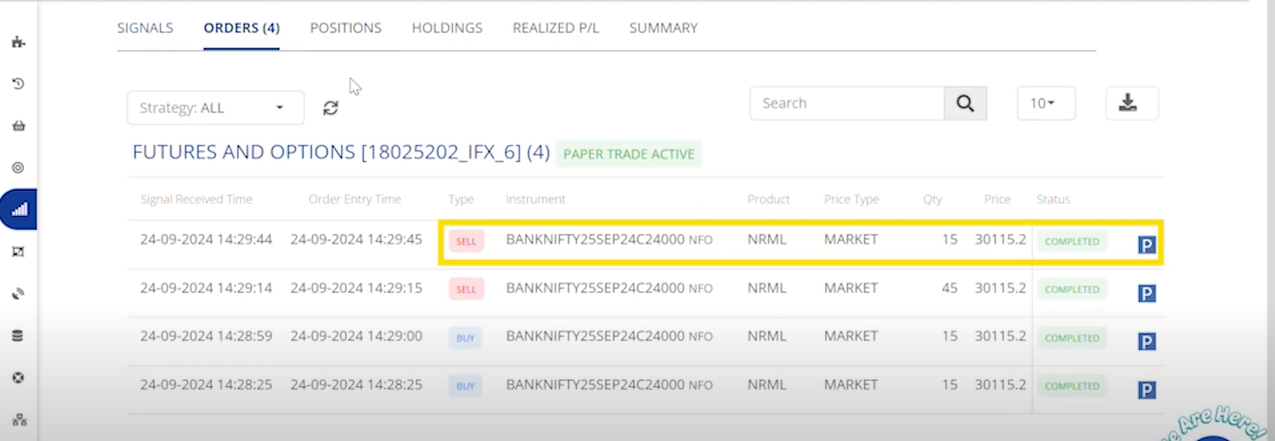
This will create a buy order for three lot of BankNifty call options in the Orders tab according to the stop + reversal strategy.&#x20;

<figure><img src="/files/upXHSPVIVBKb4ks8Wdma" alt=""><figcaption><p>Positions</p></figcaption></figure>

Under the Positions tab, you will see that the BankNifty short call position has been squared off, and a long position is created.

### *Options Dynamic* &#x20;

***Buying***

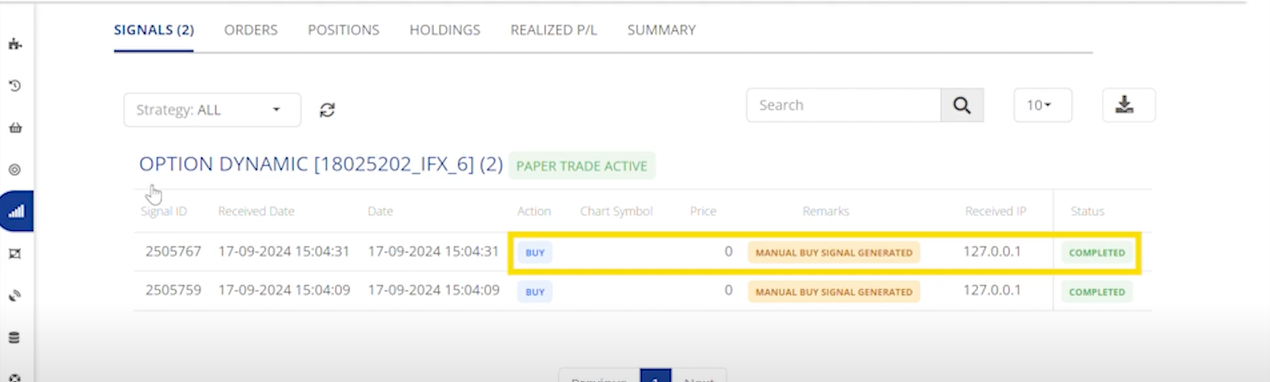
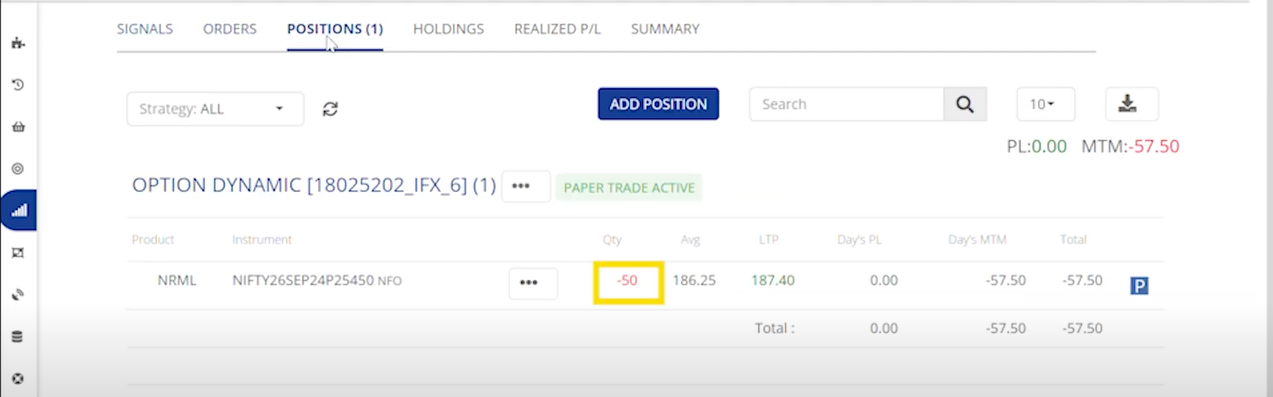
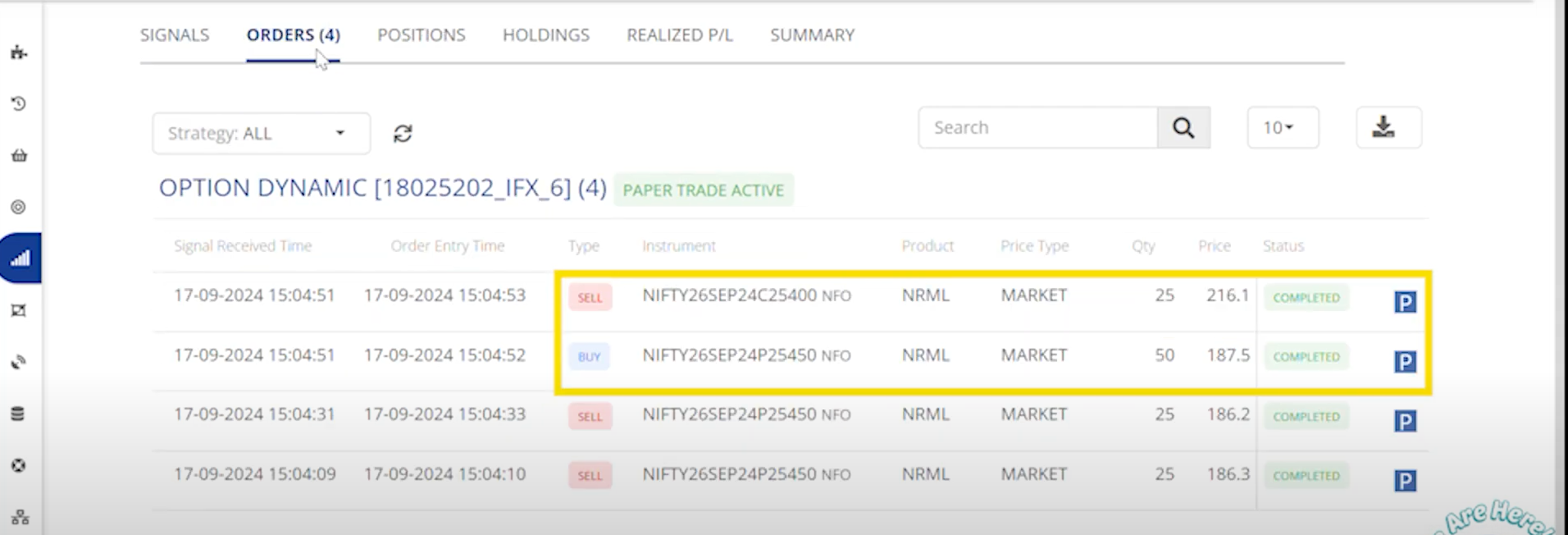
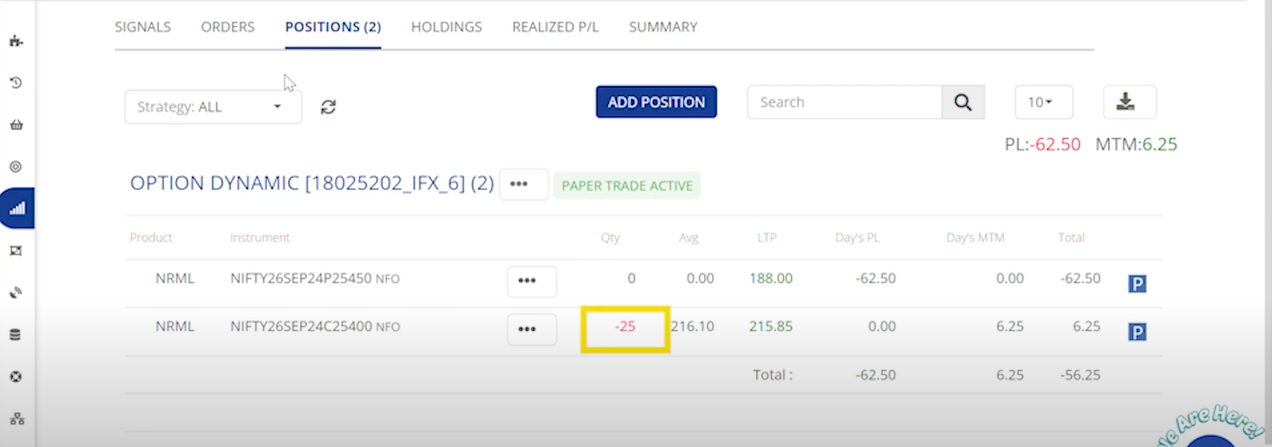
<table data-header-hidden><thead><tr><th></th><th width="150"></th><th width="144"></th><th width="147"></th><th></th></tr></thead><tbody><tr><td><strong>Signal Action</strong></td><td>BUY</td><td>SELL</td><td>SHORT</td><td>COVER</td></tr><tr><td><strong>Signal Type</strong></td><td><p>Put Position Exit</p><p>Call Position Entry</p></td><td>Call Position Exit<br>Put Position Entry</td><td>Call Position Exit<br>Put Position Entry</td><td>Put Position Exit <br>Call Position Entry</td></tr><tr><td><strong>Order Action</strong></td><td>SELL / BUY</td><td>SELL / BUY</td><td>SELL  / BUY</td><td>SELL / BUY</td></tr><tr><td><strong>Order Type</strong></td><td><p>Exit PE Order</p><p>Entry CE Order</p></td><td><p>Exit CE Order</p><p>Entry PE Order</p></td><td>Entry PE Order<br>Exit CE Order</td><td>Exit PE Order Entry CE Order</td></tr><tr><td><strong>Position Check</strong></td><td>Yes(PE)</td><td>Yes(CE)</td><td>Yes(CE)</td><td>Yes(PE)</td></tr><tr><td><strong>Sqr-Off Qty</strong></td><td>If No Open PE Positions, No Order will be Placed</td><td>If No Open CE Positions, No Order will be Placed</td><td>If No Open CE Positions, No Order will be Placed</td><td>If No Open PE Positions, No Order will be Placed</td></tr></tbody></table>

Example :&#x20;

{% embed url="<https://youtu.be/FT6AxYRUBoE>" %}

**Buy :**&#x20;

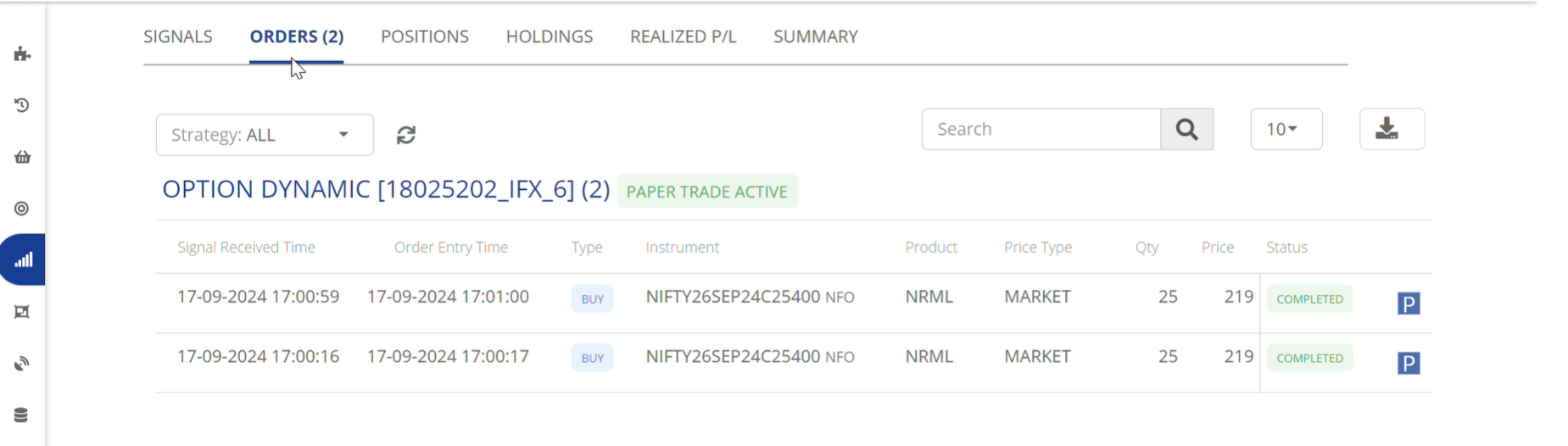
<figure><img src="/files/2wdzMcepm6UdMsqrWpW1" alt=""><figcaption><p>Orders</p></figcaption></figure>

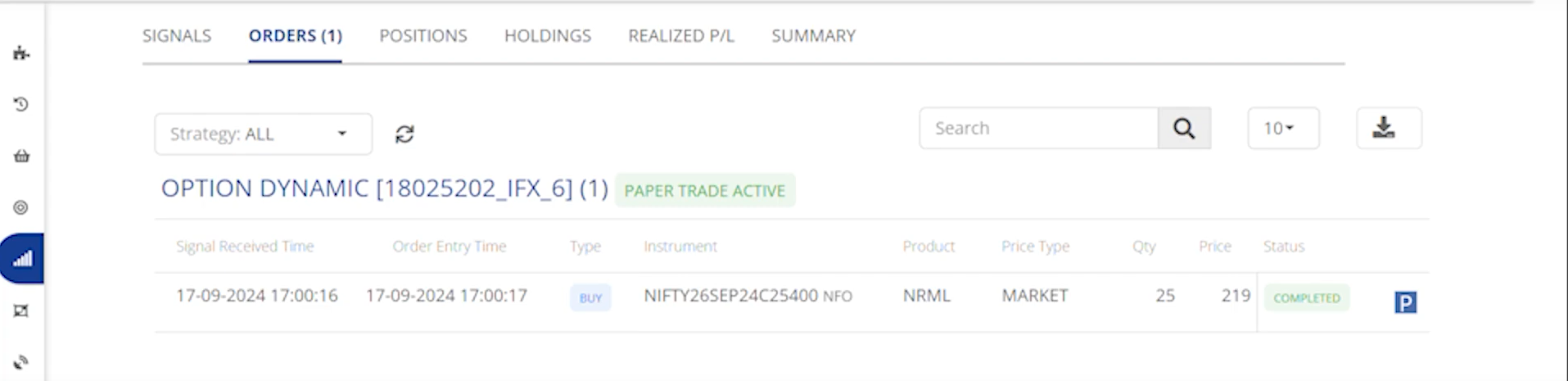
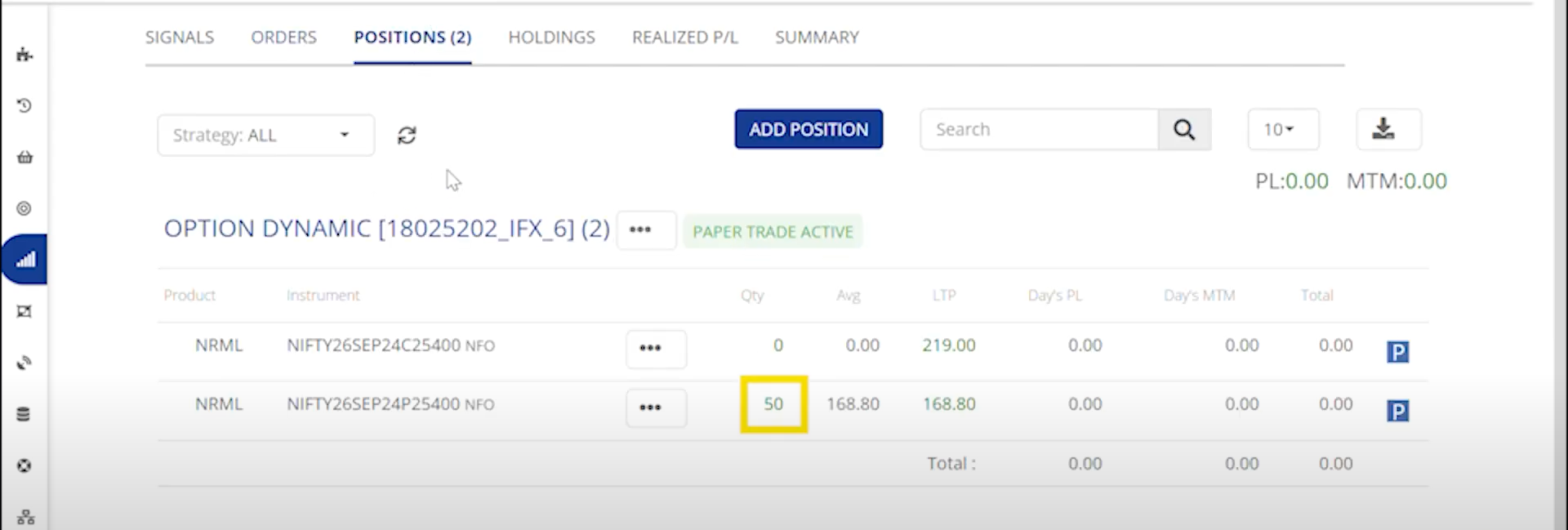
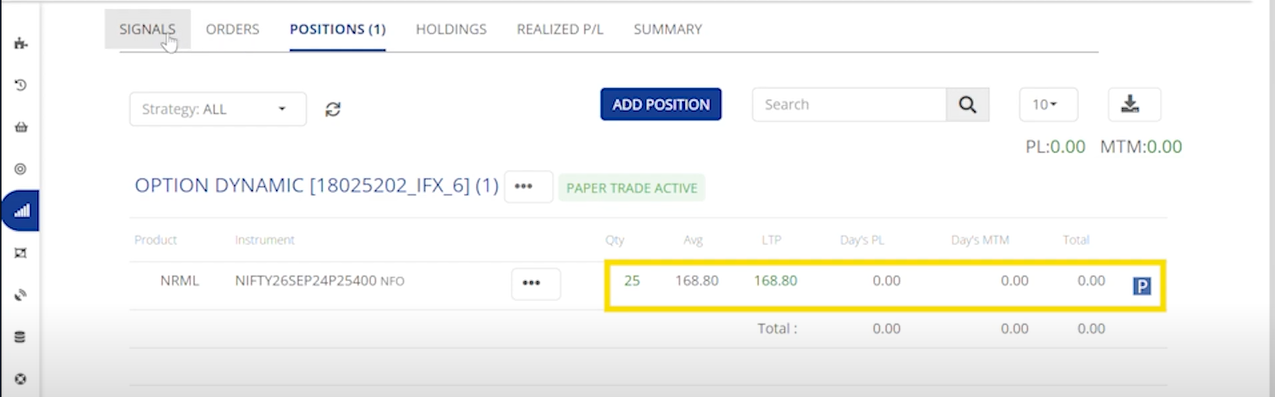
The Orders tab displays the instrument symbol and indicates that a call option has been bought. Since no put option is currently available, so no exit for a put option shown.

<figure><img src="/files/Pt02hg4Aeu0rj1YADwis" alt=""><figcaption><p>Positions </p></figcaption></figure>

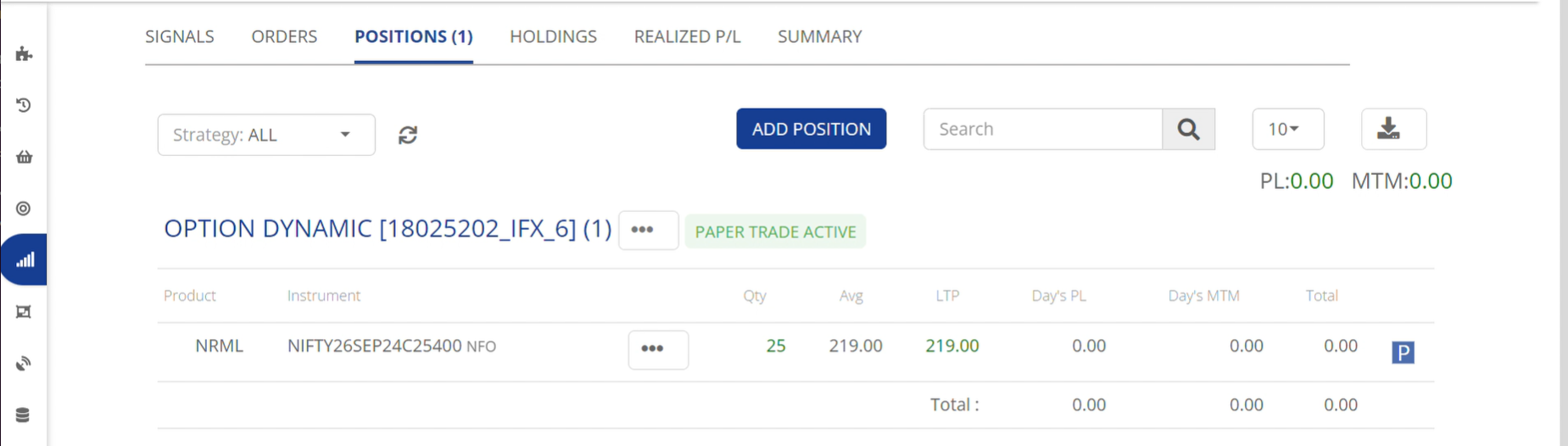
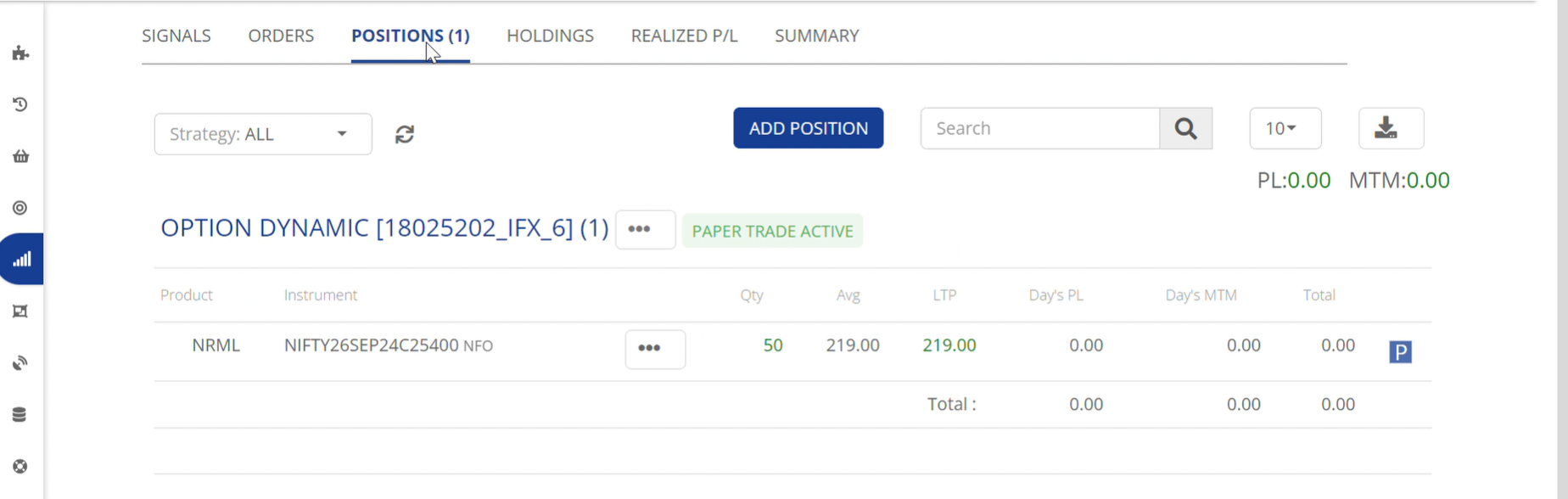
The Positions tab shows that we have a long position of 1 lot of Nifty call options.

**Second Buy :**&#x20;

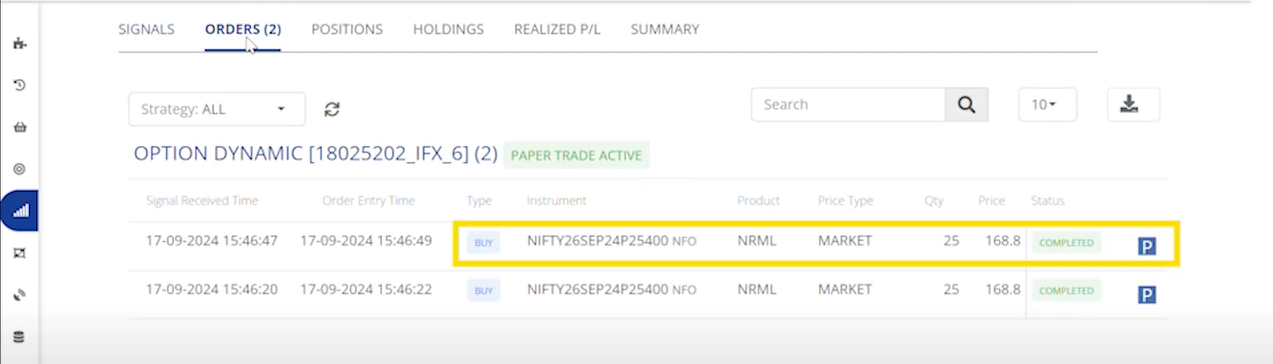
<figure><img src="/files/bQrlOj3YTX21WlhVIsIW" alt=""><figcaption><p>Orders</p></figcaption></figure>

The Orders tab contains a second buy order.

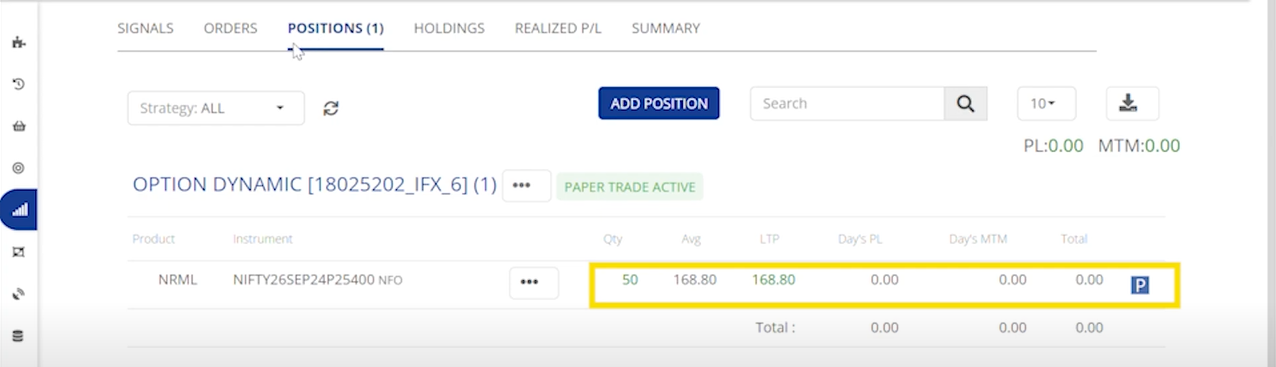
<figure><img src="/files/t6s4uDT7SXxcxTSfvcpu" alt=""><figcaption><p>Positions</p></figcaption></figure>

The Positions tab to show a total of two lots if nifty call option.

**Sell :**&#x20;

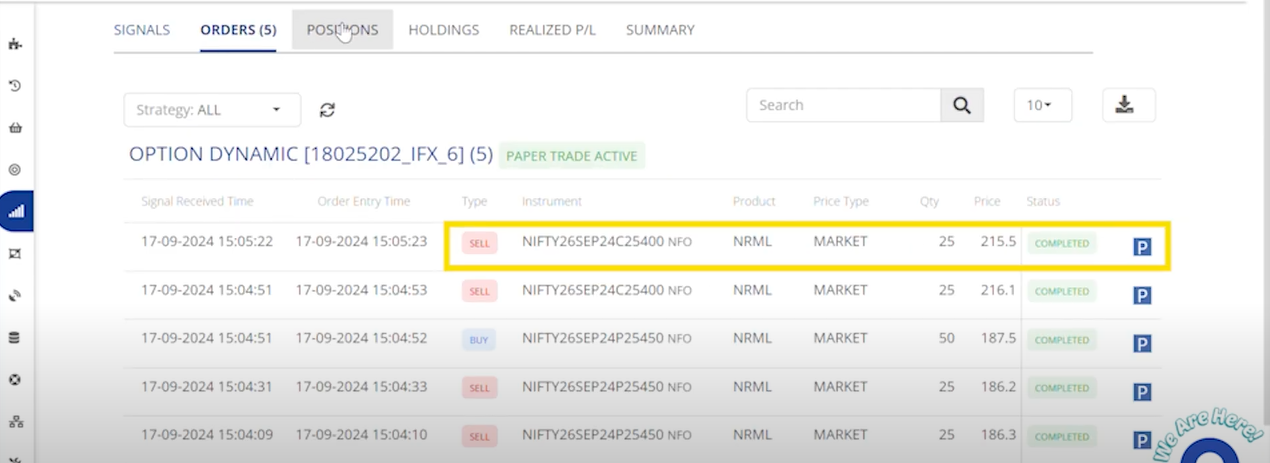
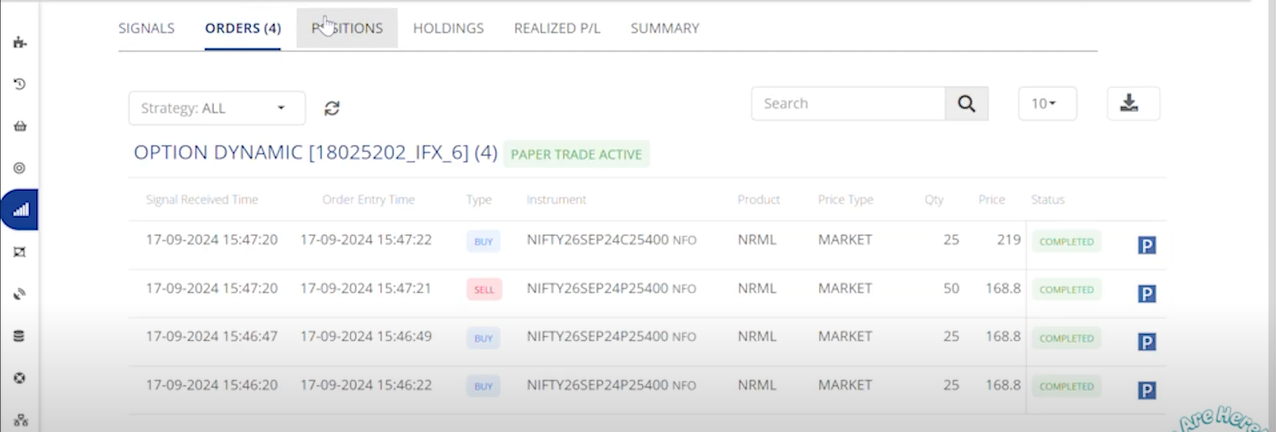
<figure><img src="/files/RMEYteBEo6bpi9ohQcT9" alt=""><figcaption><p>Orders</p></figcaption></figure>

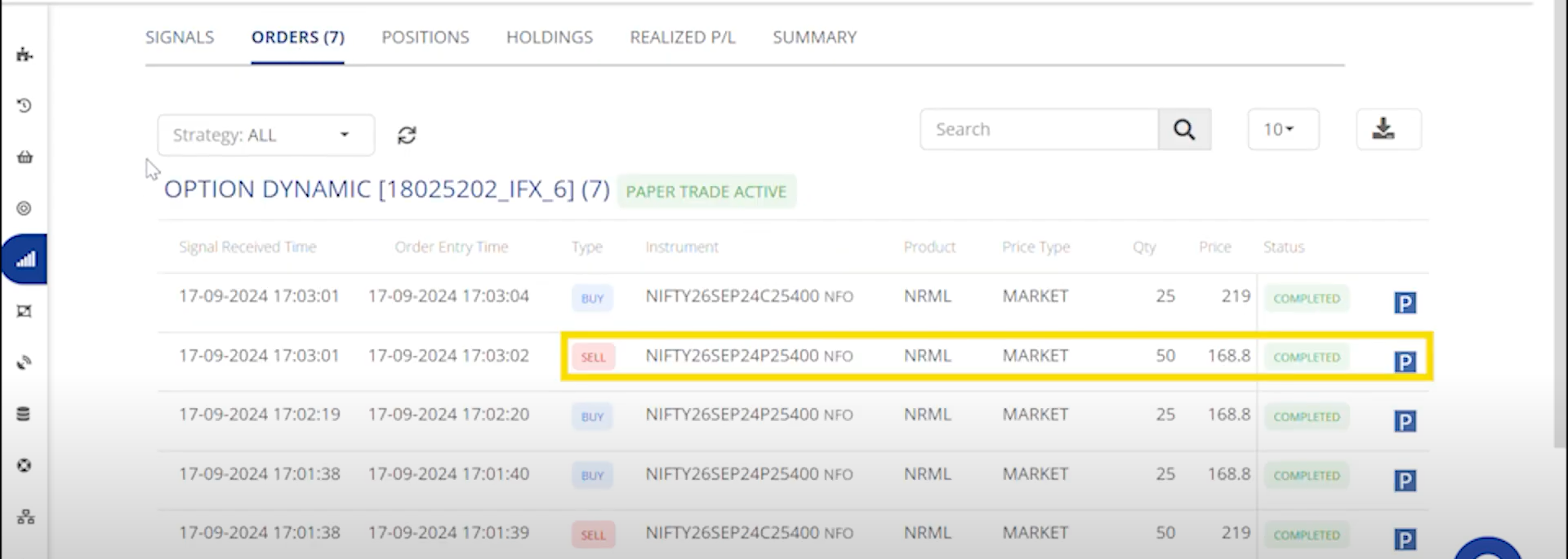
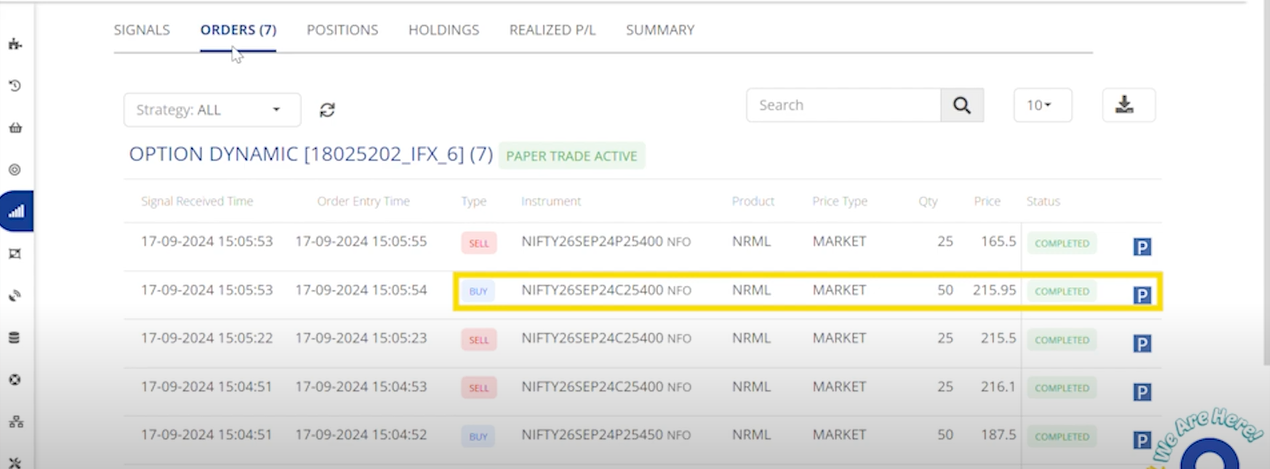
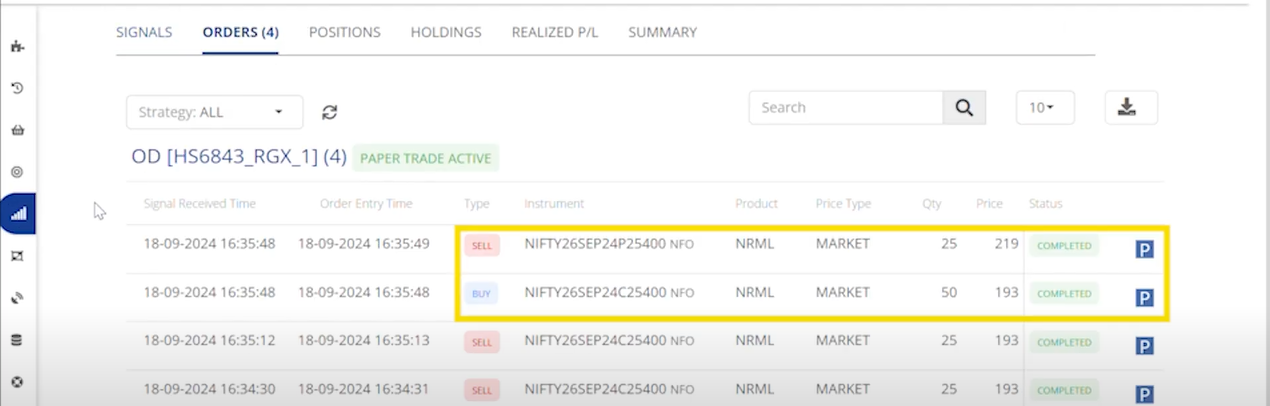
The Orders tab displays both a sell order and a buy order, and the sell order exits the existing call position while the buy order establishes a new long position in Nifty put options.

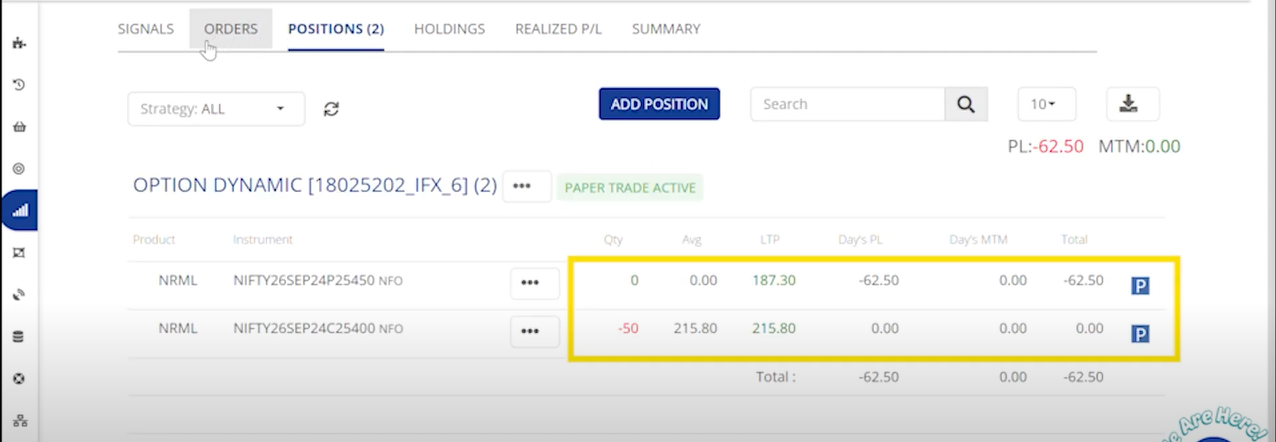
<figure><img src="/files/Qj7JXKKuSHQiatSClDV4" alt=""><figcaption><p>Positions</p></figcaption></figure>

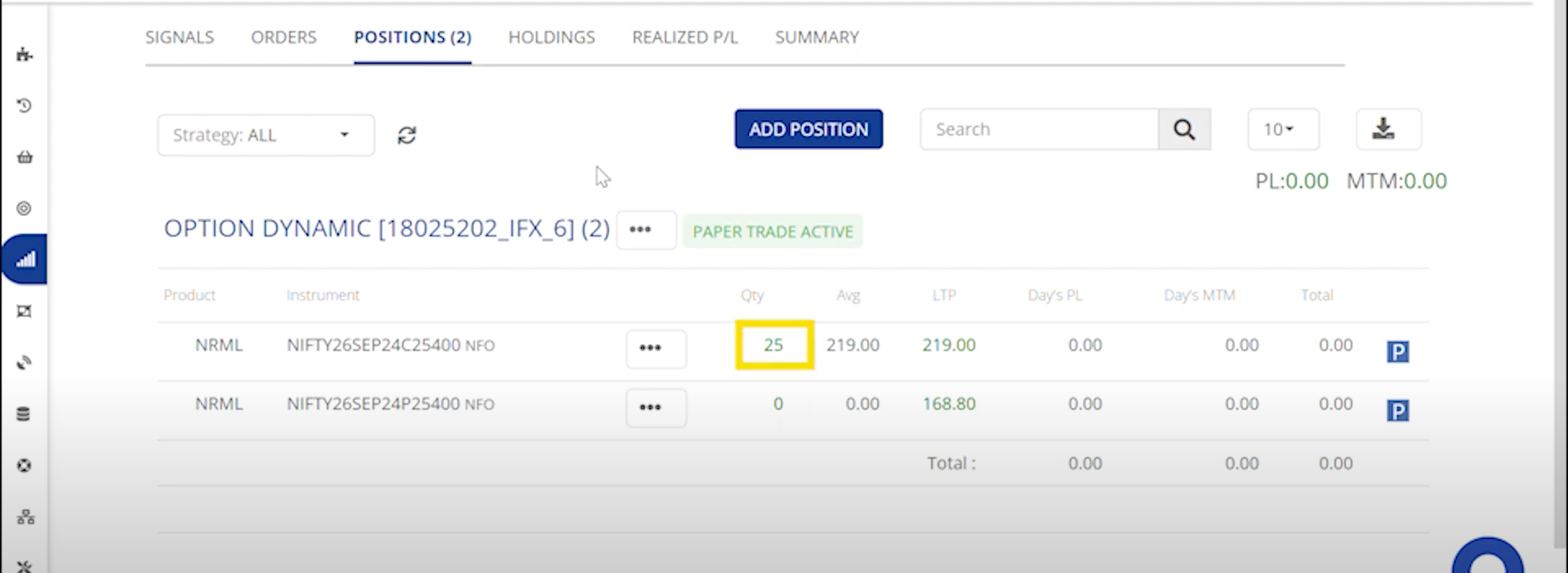
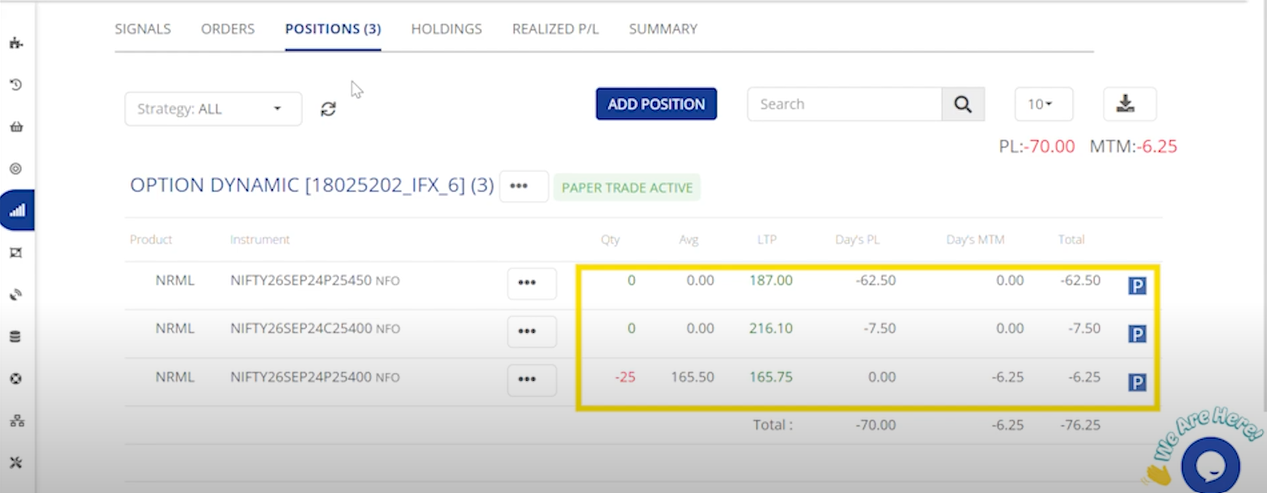
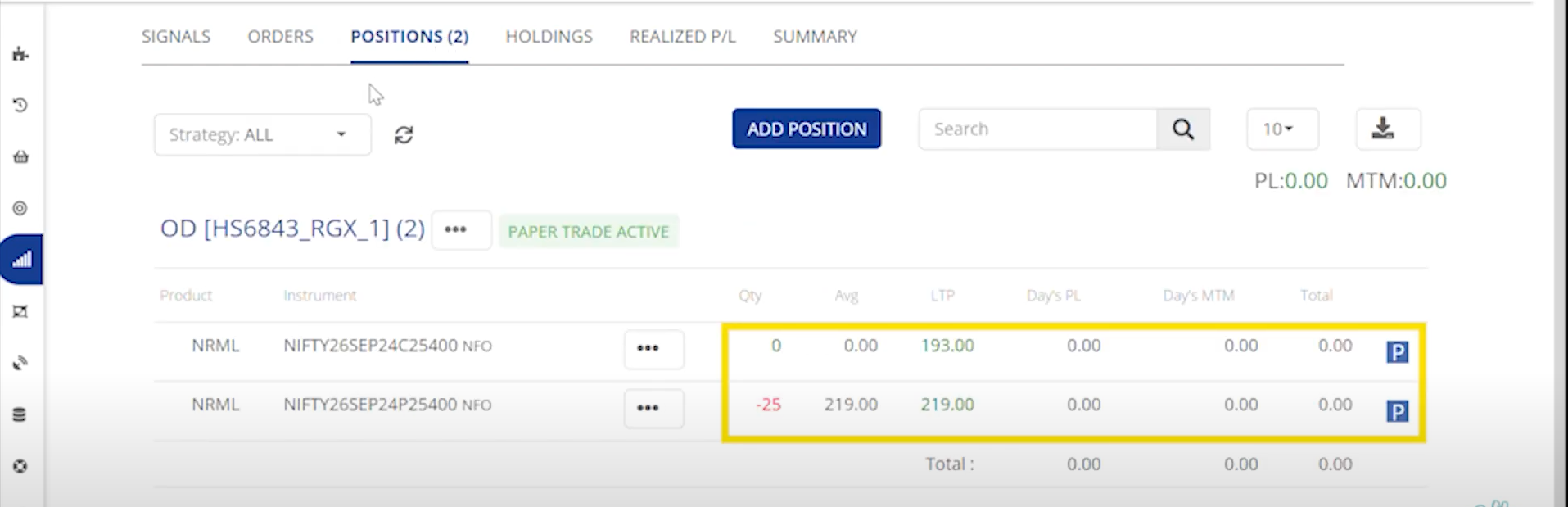
The Positions tab, you will see that the Nifty call position has been squared off and a long Nifty put position has been established.

**Short :**&#x20;

<figure><img src="/files/6N28UnxXxBLBvXQ1bnSl" alt=""><figcaption><p>Orders</p></figcaption></figure>

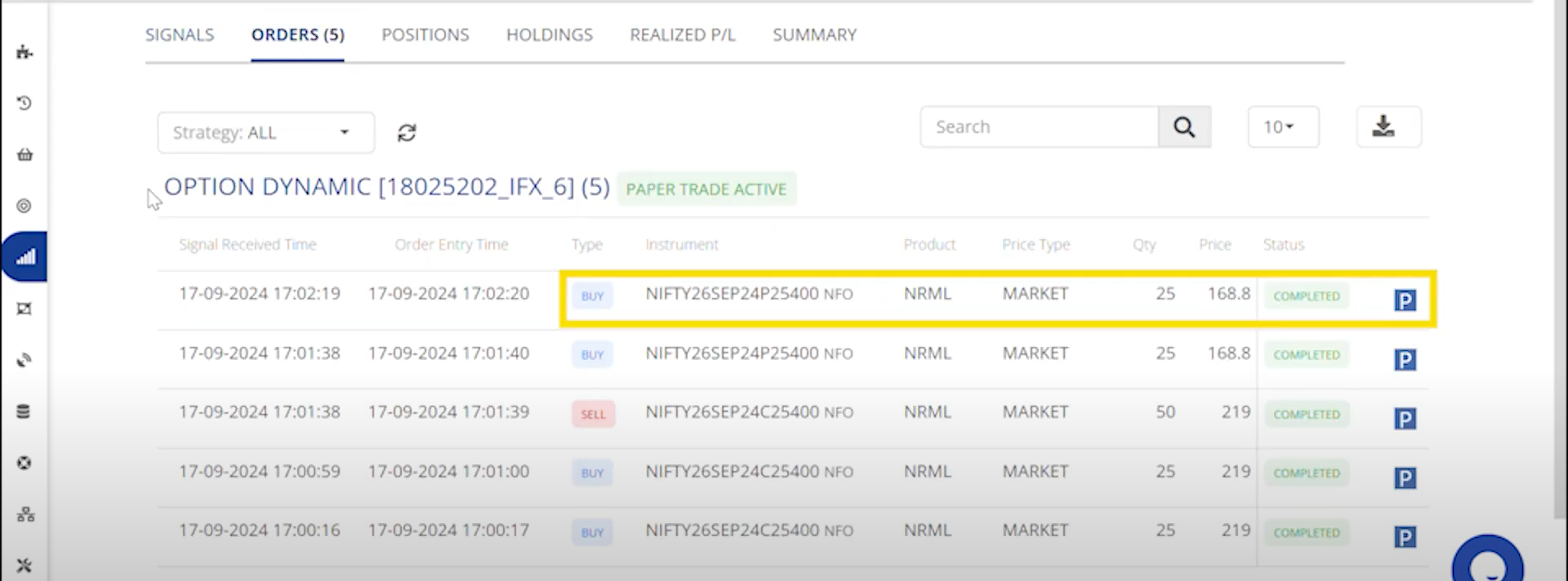
The order tab it triggers a buy order for a put position, adding to the existing put position. Since there is no call position present, no call position will be exited.

<figure><img src="/files/ZrTrcGDnE1zccY8WOOUR" alt=""><figcaption><p>Positions</p></figcaption></figure>

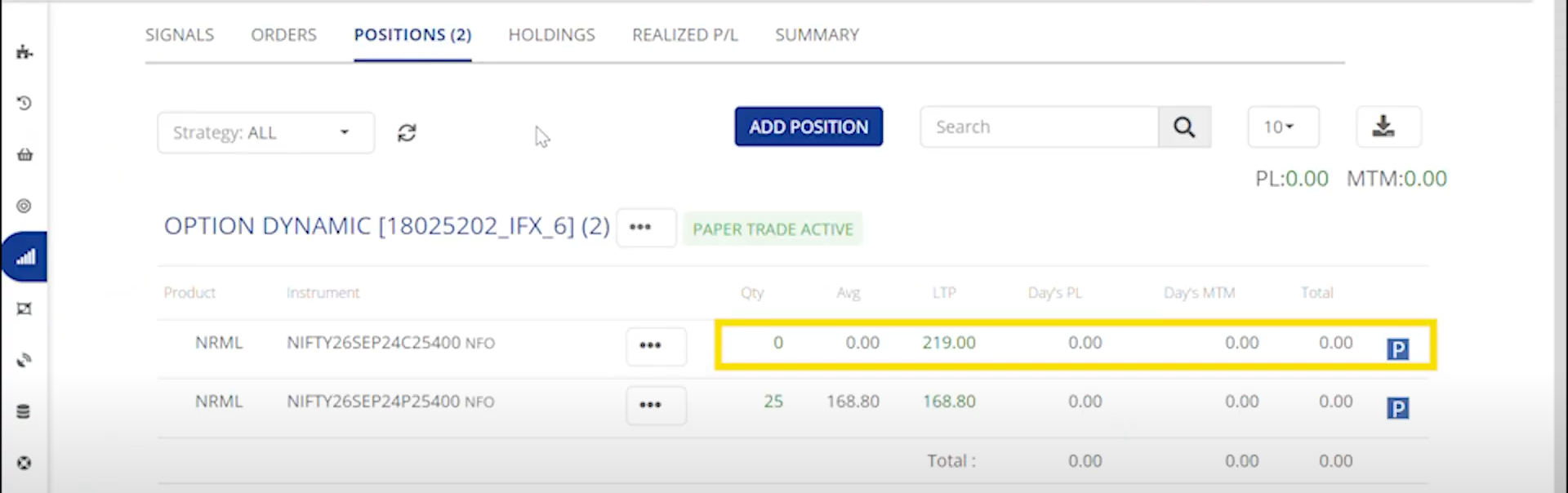
The Positions tab, has 2 lots of long Nifty put positions and a previously squared-off Nifty call position.

**Cover :**&#x20;

<figure><img src="/files/cg6Hl9t7eCGEVh2b6R4P" alt=""><figcaption><p>Orders</p></figcaption></figure>

The order tab it triggers a sell order for the existing long put position and generated a buy order for nifty call option as per the shot + cover strategy rule.

<figure><img src="/files/wIMWNTXNEkvIl93Mg8tD" alt=""><figcaption><p>Positions </p></figcaption></figure>

In the positions tab we could see that the put position is squared off and a long nifty call position is established.

***Selling***

<table data-header-hidden><thead><tr><th></th><th width="150"></th><th width="144"></th><th width="147"></th><th></th></tr></thead><tbody><tr><td><strong>Signal Action</strong></td><td>BUY</td><td>SELL</td><td>SHORT</td><td>COVER</td></tr><tr><td><strong>Signal Type</strong></td><td><p>Call Position Exit</p><p>Put Position Entry</p></td><td>Put Position Exit<br>Call Position Entry</td><td>Put Position Exit<br>Call Position Entry</td><td>Call Position Exit <br>Put Position Entry</td></tr><tr><td><strong>Order Action</strong></td><td>SELL / BUY</td><td>SELL / BUY</td><td>SELL  / BUY</td><td>SELL / BUY</td></tr><tr><td><strong>Order Type</strong></td><td><p>Exit CE Order</p><p>Entry PE Order</p></td><td><p>Exit PE Order</p><p>Entry CE Order</p></td><td>Exit PE Order<br>Entry CE Order</td><td>Exit CE Order Entry PE Order</td></tr><tr><td><strong>Position Check</strong></td><td>Yes(CE)</td><td>Yes(PE)</td><td>Yes(PE)</td><td>Yes(CE)</td></tr><tr><td><strong>Sqr-Off Qty</strong></td><td>If No Open CE Positions, No Order will be Placed</td><td>If No Open PE Positions, No Order will be Placed</td><td>If No Open PE Positions, No Order will be Placed</td><td>If No Open CE Positions, No Order will be Placed</td></tr></tbody></table>

Example :&#x20;

{% embed url="<https://youtu.be/haW4rx4wWXk>" %}

**Buy :**&#x20;

<figure><img src="/files/oPhPXR21VijBfRBBIegt" alt=""><figcaption><p>Orders</p></figcaption></figure>

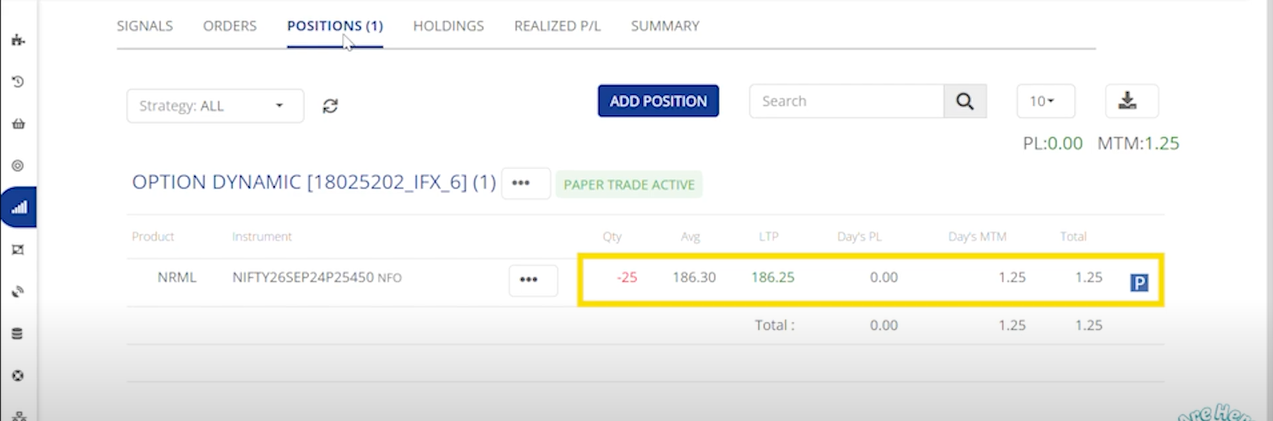
The Orders tab displays the instrument symbol and indicates that a Put option has been sold. Since no call option is currently available, so no exit for a call option shown.

<figure><img src="/files/FJlbKF7dKVpUXs3UKMzY" alt=""><figcaption><p>Positions</p></figcaption></figure>

The Positions tab shows that we have a short position of 1 lot of Nifty put options.

**Second Buy :**&#x20;

<figure><img src="/files/RMGeUhMmnosAYTKWL8AF" alt=""><figcaption><p>Orders</p></figcaption></figure>

The Orders tab Displays a second sell order.

<figure><img src="/files/VqjiAEfuuBy8D54Nyk9X" alt=""><figcaption><p>Positions</p></figcaption></figure>

The Positions tab shows that we have a short position of two lots if nifty put option.

**Sell :**&#x20;

<figure><img src="/files/c4dG1TLkwvD40vYQPe0H" alt=""><figcaption><p>Orders</p></figcaption></figure>

The Orders tab displays both a buy order and a sell order, and the buy order Squares off the existing Put position while the sell order establishes a new short position in Nifty call options.

<figure><img src="/files/D180BpEWuoeyUUW3xVr8" alt=""><figcaption><p>Positions</p></figcaption></figure>

The Positions tab, you will see that the Nifty put position has been squared off and a short Nifty call position has been established.

**Short :**&#x20;

<figure><img src="/files/e58n04EH9xAyJ5g7ROdD" alt=""><figcaption><p>Orders</p></figcaption></figure>

In the orders tab it triggers a sell order for a call position, adding to the existing short call position. Since there is no put position present, so no put position will be squared off.

<figure><img src="/files/0BBaEixQFWgWa5o7ZCk2" alt=""><figcaption><p>Positions</p></figcaption></figure>

In the Positions tab, you’ll find 2 lots of short Nifty call positions and a previously squared-off Nifty put position.

**Cover :**&#x20;

<figure><img src="/files/jTnWcNi7N5NGirMyOWxf" alt=""><figcaption><p>Orders</p></figcaption></figure>

In the order tab it triggers a buy order for the existing short nifty call position and generated a sell order for nifty put option creating a short position as per the stop + cover strategy rule.

<figure><img src="/files/s35H2asHowouc7vmA0bj" alt=""><figcaption><p>Positions</p></figcaption></figure>

Under the positions tab we could see that the call position is squared off and a short nifty put position is established.

### *Option Hedge*&#x20;

***Buying***&#x20;

<table data-header-hidden><thead><tr><th></th><th width="150"></th><th width="144"></th><th width="147"></th><th></th></tr></thead><tbody><tr><td><strong>Signal Action</strong></td><td>BUY</td><td>SELL</td><td>SHORT</td><td>COVER</td></tr><tr><td><strong>Signal Type</strong></td><td><p>Call Position Exit</p><p>Put Position Entry</p></td><td>Put Position Exit<br>Call Position Entry</td><td>Put Position Exit<br>Call Position Entry</td><td>Call Position Exit <br>Put Position Entry</td></tr><tr><td><strong>Order Action</strong></td><td>SELL / BUY</td><td>SELL / BUY</td><td>SELL  / BUY</td><td>SELL / BUY</td></tr><tr><td><strong>Order Type</strong></td><td><p>Exit CE Order</p><p>Entry PE Order</p></td><td><p>Exit PE Order</p><p>Entry CE Order</p></td><td>Exit PE Order<br>Entry CE Order</td><td>Exit CE Order Entry PE Order</td></tr><tr><td><strong>Position Check</strong></td><td>Yes(CE)</td><td>Yes(PE)</td><td>Yes(PE)</td><td>Yes(CE)</td></tr><tr><td><strong>Sqr-Off Qty</strong></td><td>If No Open CE Positions, No Order will be Placed</td><td>If No Open PE Positions, No Order will be Placed</td><td>If No Open PE Positions, No Order will be Placed</td><td>If No Open CE Positions, No Order will be Placed</td></tr></tbody></table>

Example :&#x20;

{% embed url="<https://youtu.be/EMaYqXB9bBI>" %}

**Buy :**&#x20;

<figure><img src="/files/8T1XgmA6GiofIqFwELMJ" alt=""><figcaption><p>Orders</p></figcaption></figure>

The Orders tab displays the instrument symbol and indicates that a put option has been bought. Since no call option is currently available, so no exit for a call option shown.

<figure><img src="/files/2HgqT82NUv0XqthpD7NC" alt=""><figcaption><p>Positions</p></figcaption></figure>

The Positions tab shows that we have a long position of 1 lot of Nifty put options.

**Second Buy :**&#x20;

<figure><img src="/files/TQC5BtuCCC0Ez47dv5tO" alt=""><figcaption><p>Orders</p></figcaption></figure>

The Orders tab is updated with a second Buy order

<figure><img src="/files/bAvspgJZA0xWFrjPxN9c" alt=""><figcaption><p>Positions</p></figcaption></figure>

The Positions tab displays a total position of two lots of nifty put option.

**Sell :**&#x20;

<figure><img src="/files/uqjQTOqnnBbYpw0hLocE" alt=""><figcaption><p>Orders</p></figcaption></figure>

The Orders tab displays both a sell order and a buy order, and the sell order exits the existing put position while the buy order establishes a new long position in Nifty call options.

<figure><img src="/files/hqOwkt3lJedRdHgWP08q" alt=""><figcaption><p>Positions</p></figcaption></figure>

Under the Positions tab, you will see that the Nifty put position has been squared off and a long Nifty call position has been established.

**Short :**&#x20;

<figure><img src="/files/VKgqdnebwvvOsx4e6LrK" alt=""><figcaption><p>Orders</p></figcaption></figure>

In the order tab it triggers a buy order for a call position, adding to the existing call position. Since there is no put position present, no put position will be exited.

<figure><img src="/files/H6RhaZoVmtjgCLiE5rG9" alt=""><figcaption><p>Positions </p></figcaption></figure>

In the Positions tab, you’ll find two lots of long Nifty call positions and a previously squared-off Nifty put position.

**Cover :**&#x20;

<figure><img src="/files/sKsKesp0Za4kdMaZHqOY" alt=""><figcaption><p>Orders</p></figcaption></figure>

In the order tab it triggers a sell order for the existing long call position and generated a buy order for nifty put option as per the stop + cover strategy rule.

<figure><img src="/files/HiKxQRBXHsyXBgwUQwkM" alt=""><figcaption><p>Positions</p></figcaption></figure>

Under the positions tab we could see that the call position is squared off and a long nifty put position is established

***Selling***&#x20;

<table data-header-hidden><thead><tr><th></th><th width="150"></th><th width="144"></th><th width="147"></th><th></th></tr></thead><tbody><tr><td><strong>Signal Action</strong></td><td>BUY</td><td>SELL</td><td>SHORT</td><td>COVER</td></tr><tr><td><strong>Signal Type</strong></td><td><p>Put Position Exit</p><p>Call Position Entry</p></td><td>Call Position Exit<br>Put Position Entry</td><td>Call Position Exit<br>Put Position Entry</td><td>Put Position Exit <br>Call Position Entry</td></tr><tr><td><strong>Order Action</strong></td><td>SELL / BUY</td><td>SELL / BUY</td><td>SELL  / BUY</td><td>SELL / BUY</td></tr><tr><td><strong>Order Type</strong></td><td><p>Exit PE Order</p><p>Entry CE Order</p></td><td><p>Exit CE Order</p><p>Entry PE Order</p></td><td>Entry PE Order<br>Exit CE Order</td><td>Exit PE Order Entry CE Order</td></tr><tr><td><strong>Position Check</strong></td><td>Yes(PE)</td><td>Yes(CE)</td><td>Yes(CE)</td><td>Yes(PE)</td></tr><tr><td><strong>Sqr-Off Qty</strong></td><td>If No Open PE Positions, No Order will be Placed</td><td>If No Open CE Positions, No Order will be Placed</td><td>If No Open CE Positions, No Order will be Placed</td><td>If No Open PE Positions, No Order will be Placed</td></tr></tbody></table>

Example :&#x20;

{% embed url="<https://youtu.be/EMaYqXB9bBI>" %}

**Buy :**&#x20;

<figure><img src="/files/Ocvf7LokuTXbSq8wXJP2" alt=""><figcaption><p>Orders</p></figcaption></figure>

The Orders tab displays the instrument symbol and indicates that a call option has been sold. Since no put option is currently available, so no buy for a put option is placed.

<figure><img src="/files/ozXM6FeCE5LQEPJ77o69" alt=""><figcaption><p>Positions</p></figcaption></figure>

The Positions tab shows that we have a short position of 1 lot of Nifty call options.

**Second Buy :**&#x20;

<figure><img src="/files/CSdew2pU9OsO5TasuUHu" alt=""><figcaption><p>Orders</p></figcaption></figure>

This will update the Orders tab with a second sell order.

<figure><img src="/files/qC0e6YuWxVVY4k3sgzj7" alt=""><figcaption><p>Positions</p></figcaption></figure>

The Positions tab shows that we have a short position of two lots if nifty call option.

**Sell :**&#x20;

<figure><img src="/files/YwmTI3Yrj0hPOSwH3lpi" alt=""><figcaption><p>Orders</p></figcaption></figure>

the Orders tab displays both a buy order and a sell order, and the buy order Squares off the existing call position while the sell order establishes a new short position in Nifty put options.

<figure><img src="/files/sjpuAidAFhevku0z4ddV" alt=""><figcaption><p>Positions</p></figcaption></figure>

Under the Positions tab, you will see that the Nifty call position has been squared off and a short Nifty put position has been established.

**Short :**&#x20;

<figure><img src="/files/WqiWVbNAUASpJvLzqJBP" alt=""><figcaption><p>Orders</p></figcaption></figure>

In the order tab it triggers a buy order for a put position, adding to the existing short put position. Since there is no call position present, so no call position will be squared off.&#x20;

<figure><img src="/files/vXq0MNGxPpyrZbcDZ0Ec" alt=""><figcaption><p>Positions</p></figcaption></figure>

In the Positions tab, you’ll find 2 lots of short Nifty put positions and a previously squared-off Nifty call position.

**Cover :**&#x20;

<figure><img src="/files/1wzoq2cK23CKu2GnHVWf" alt=""><figcaption><p>Orders</p></figcaption></figure>

In the order tab it triggers a buy order for the existing short nifty put position and generated a sell order for nifty call option creating a short position as per the \
stop + cover strategy rule.

<figure><img src="/files/3hRYhfv9kRQ7ZTewqJsz" alt=""><figcaption><p>Positions</p></figcaption></figure>

Under the positions tab we could see that the put position is squared off and a short nifty call position is established.


---

# Agent Instructions: Querying This Documentation

If you need additional information that is not directly available in this page, you can query the documentation dynamically by asking a question.

Perform an HTTP GET request on the current page URL with the `ask` query parameter:

```
GET https://docs.algomojo.com/algomojo/strategy-rule/stop-+-reversal.md?ask=<question>
```

The question should be specific, self-contained, and written in natural language.
The response will contain a direct answer to the question and relevant excerpts and sources from the documentation.

Use this mechanism when the answer is not explicitly present in the current page, you need clarification or additional context, or you want to retrieve related documentation sections.